 CloudRadial
Co-Managed IT: How MSPs and Internal IT Teams Share One Client Experience
Co-managed IT used to be the deal you took when a prospect wouldn't let go of their in-house team. That's not where things stand now. Coverage of the...



Enterprise-grade infrastructure with the flexibility MSPs demand

Perfectly tailored AI that knows your specific MSP

Build your own Shopify-like store with your PSA products & distributors

Have clients to submit tickets directly to your PSA, freeing up your team's time

Pre-triage and route tickets correctly with the help of AI

Everything you need to start automating, no code required.
Before you choose one, evaluate it on seven factors: how deep its branding goes, where it lives in your clients' workday, how well it integrates with your stack, whether its self-service produces better tickets, how clearly it reports your value, how honestly it handles deployment, and whether it ultimately makes your MSP harder to replace.
The rest of this article works through each one, with the question to ask a vendor about it.
Most of what an MSP delivers is invisible by design. Patches land, threats are blocked, backups run, and tickets close, and when the work goes well the client notices none of it.
CloudRadial's 2026 State of AI in the MSP Industry report, a survey of more than 100 MSPs, states the principle plainly: a capability creates client value only if the client can see it. Work done well but silently does little for retention or for how a client judges what they pay for. Independent research agrees the pressure is rising: Kaseya's 2026 State of the MSP Report, drawn from more than 1,000 MSPs, found the share of providers struggling to demonstrate their value early nearly doubled in a year, climbing from 10% to 19%.
A client portal is the surface where that value becomes visible or stays hidden. Choose well and it is the place a client sees everything you do for them. Choose poorly and it becomes another login nobody uses, and your work stays invisible exactly when it needs to be seen.
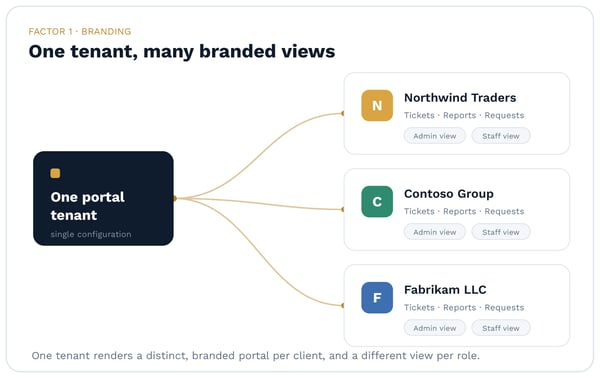
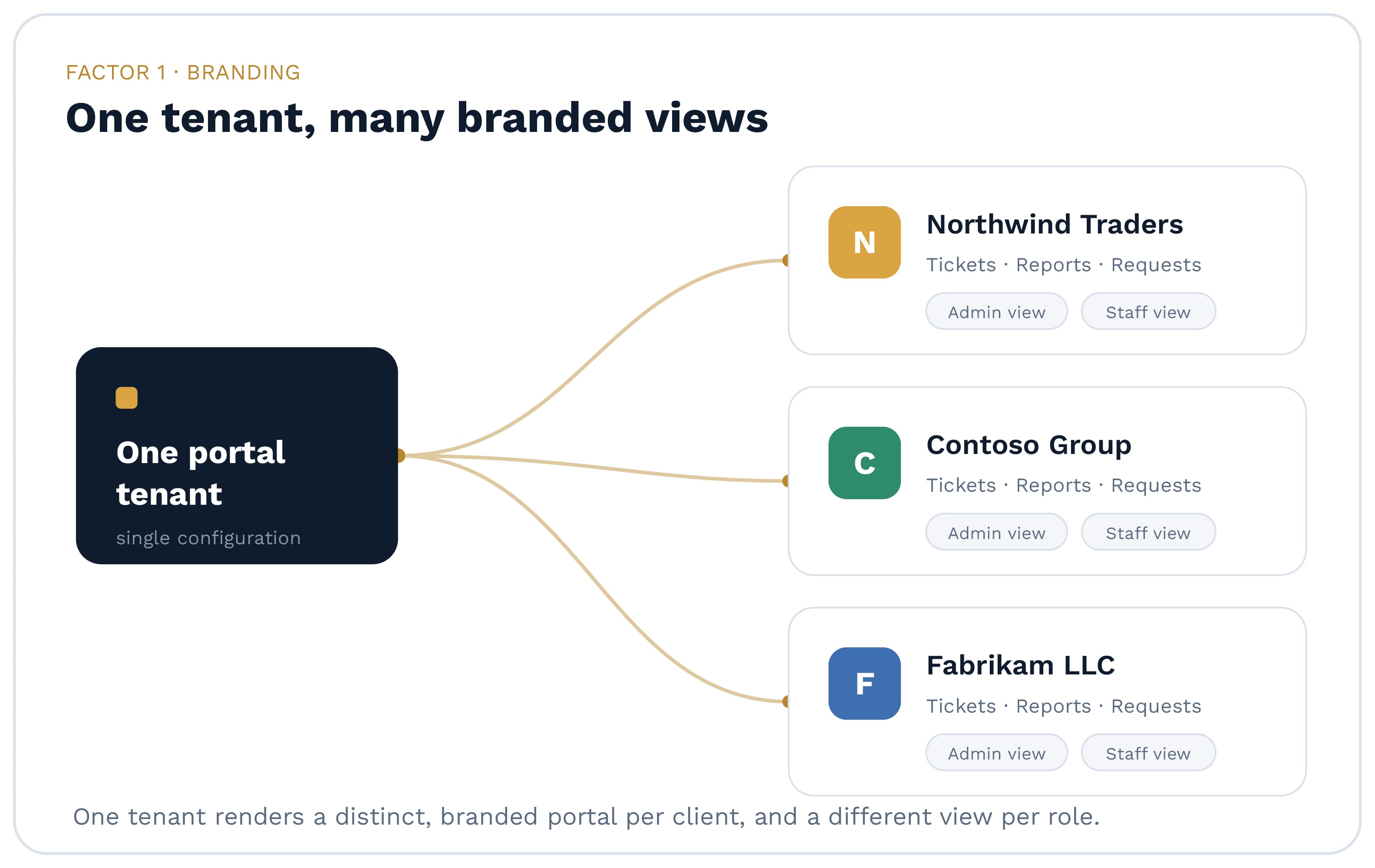
A true white-label portal should let you deliver a distinct branded environment per client, and a different view per role inside that client, all from a single tenant. That is the difference between white-label and a logo swap on a generic template.
Ask the vendor: can I show two different clients two genuinely different portals, and can I show a budget-owning IT manager a different experience than a front-desk end user, without standing up a separate instance for each? Real per-client and per-role configuration is what lets one platform serve a wildly different-looking portal to every account you support.
Adoption is a function of location, not feature count. The real competition for a client portal is not a rival portal. It is Outlook, the reflex a user reaches for the moment they need IT help. A portal that lives only at a separate URL is fighting that reflex, and it usually loses.
Look for delivery where your clients already work: in a browser, in a desktop or system-tray app, and embedded inside Microsoft Teams. The request surface should meet the user where they are instead of asking them to remember another address and password. Weight this factor heavily. A feature-rich portal nobody opens is worth less than a simpler one that shows up in the daily workflow.
A portal is only as valuable as what it is wired to. The factor that most separates a serious MSP portal from a generic one is the depth and honesty of its integrations.
Verify a real, supported, two-way connection to the PSA you actually run, one that creates, reads, and updates tickets through the API rather than routing email. "Integrates with your PSA" should mean your PSA by name, not a roadmap promise. From there, look at how the portal connects to the rest of the stack: RMM, Microsoft 365, documentation tools like IT Glue, training or LMS content, and a procurement storefront. Without those connections a portal is a slightly nicer intranet. With them, it compounds in value.
CloudRadial's Unified Client Portal, for example, integrates directly with ConnectWise Manage, Autotask, HaloPSA, Syncro, and Kaseya BMS, and pulls endpoint, license, and tenant data on top. The specific list matters less than the principle: confirm the integrations you depend on are supported and bidirectional before you commit.
The point of client self-service is not to make requests disappear. It is to make the ticket that results genuinely useful.
Be cautious of any portal sold on the promise of avoiding tickets. For a managed services business that runs on SLAs, billing, and reporting, a request resolved with no record is not a saved cost. It is an erased record of work that was needed. The better benchmark is ticket quality. Look for request forms with conditional logic, attachments, and single or multi-level approvals, all routing to the right PSA board and type automatically. Good self-service turns "it's broken" into a structured, categorized ticket a technician can start on, and it holds requests that need sign-off in a waiting state until the right person approves. Easier to submit, better structured on arrival.
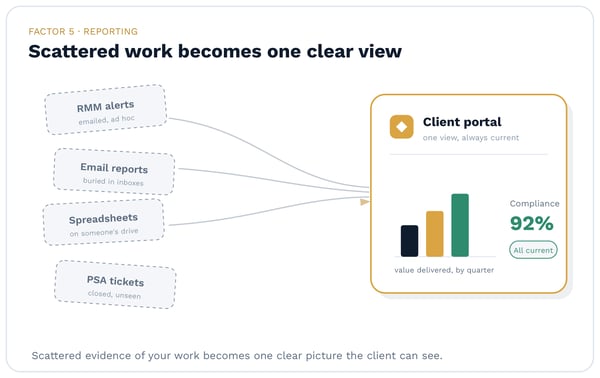
Clients renew when they can see what they are paying for. A strong portal turns scattered evidence, spread across RMM tools, email, and spreadsheets, into a clear and current picture of the relationship.
Look for on-demand reporting your account managers can generate without days of manual assembly: QBR and inventory reports, a shared roadmap or planner the client can follow between meetings, and a compliance view that scores each client against policies you define. This is the half of the portal that speaks to renewal and account growth, and it maps directly to the visibility gap described above. One practical note: reporting, compliance policies, and on-demand QBR capabilities are typically higher-tier features, so confirm what sits on which plan before you build your value story around them.
Provisioning a portal is fast. Configuring one worth showing a client takes real work, and the gap between those two things is where portal projects quietly stall.
Treat any "instant" or "zero-touch" deployment claim with suspicion. Branding, per-client content, PSA configuration, and Microsoft 365 tenant connections all take intentional setup, and a portal that is never finished is never launched. The more useful question is what the vendor does to get you across that gap. Look for structured onboarding: a defined launch program and a named onboarding contact who owns your go-live, not just a documentation link. On the scale side, confirm the portal is configured per client and per role from one tenant, and that pricing scales sensibly as you grow, for instance by synced users or endpoints in brackets that get cheaper per user at volume.
The best portal does more than field requests. It makes your MSP harder to replace by keeping the value you deliver continuously visible.
When tickets, reports, invoices, projects, and compliance posture all live in one branded place, the client sees the accumulated relationship rather than a price line on a renewal quote. Stickiness comes from visibility. It also helps when the portal serves as a single identity and access layer for the other tools you deploy, so you are managing one model of who each client is rather than reconciling several. Ask whether the portal is a standalone widget or the connective tissue of the client relationship. The answer tends to predict how a renewal conversation will go.
Run any portal you are evaluating against these seven factors and a pattern tends to emerge quickly. Branding, integration depth, and where the portal lives decide whether it gets used at all. Self-service quality and reporting decide whether it earns its place in your value story. Honest deployment and long-term stickiness decide whether it pays off after the first quarter. The portal that scores well across all seven is the one worth putting your brand on.
If you want to see how CloudRadial approaches these seven factors in a single platform, book a walkthrough of the Unified Client Portal.
For the wider market picture behind the value-proof pressure discussed above, read CloudRadial's 2026 State of AI in the MSP Industry report.
What is a white-label MSP client portal? It is a branded, self-service surface an MSP gives its clients to submit and track requests, view reports and invoices, and see the state of their IT, presented under the MSP's own brand rather than a vendor's. The strongest ones are configurable per client and per role and integrate directly with the MSP's PSA and other tools.
What should an MSP look for when choosing a client portal? Prioritize the factors that determine whether the portal is used and useful: configurable per-client branding, delivery where clients already work, deep two-way PSA and stack integration, self-service that produces well-structured tickets, reporting that makes MSP value visible, realistic deployment support, and a design that strengthens the client relationship over time.
Does a client portal reduce ticket volume? That is the wrong benchmark for an MSP. A portal's value is not in avoiding tickets but in making the tickets it captures cleaner and easier to submit. Because SLAs, billing, and reporting all depend on the ticket record, a request handled with no ticket is a lost record of work rather than a saved cost. Judge a portal on the quality and structure of what it captures.
Which PSAs should an MSP client portal integrate with? At minimum, the portal should integrate directly and bidirectionally with the PSA you already run. Common targets in the MSP market include ConnectWise Manage, Autotask, HaloPSA, Syncro, and Kaseya BMS. Confirm the connection is supported and two-way, not a one-directional feed or a planned feature.
Is a white-label portal different from the portal built into my PSA? The technical feature lists often overlap. The practical difference is adoption. A stock PSA portal usually asks a user to remember a URL and log in, so most clients never do. A well-chosen white-label portal shows up where the user already works and brings the request, the ticket, and the reporting with it, which is what turns it into a surface clients actually use.
How long does it take to deploy a client portal? Provisioning can take minutes, but a client-ready portal, one that is branded, wired to your PSA and Microsoft 365, and stocked with the right content, takes deliberate configuration. Plan for a structured onboarding period and prioritize vendors who provide hands-on launch support, since an unfinished portal is the most common reason these projects fail to launch.
@2x.png)
Co-managed IT used to be the deal you took when a prospect wouldn't let go of their in-house team. That's not where things stand now. Coverage of the...
@2x.png)
Ticket triage doesn't get much attention. It's the work between a request showing up and someone actually fixing it, and it's easy to treat as a...
@2x.png)
You know the email. "Any update on this?" Four words, and it lands in the inbox of whoever is nearest the service desk.