





 CloudRadial
Building Automations is the Easy Part Now. Here's What MSPs Should Look For Instead.
Rewst, Pia, or AutomationAI: which one wins? That was the question behind our latest webinar. The honest answer: the automation itself matters less...
Rewst, Pia, or AutomationAI: which one wins? That was the question behind our latest webinar. The honest answer: the automation itself matters less than you think.
A year ago, the difference between MSP automation platforms came down to how hard they were to build in, learn, and manage. That gap is closing fast. Every platform now has AI that writes automations for you, and so does the $20 AI subscription on your laptop.
What still separates a platform from a pile of scripts is everything around the automation. Where it runs. Who holds the keys. How it handles 50 clients instead of one. And whether it connects to the way you actually deliver service.
CloudRadial CEO Jeff Farris, VP of Communications Ricky Cecchini, and Nick Westgate, who works hands-on with partners building in CloudRadial AutomationAI, walked through all of it live. Here's what they covered.
Ricky opened by answering the webinar's title question up front. Rewst, Pia, and AutomationAI are all MSP-focused automation platforms. Any one of them will beat a random script sitting on a tech's laptop.
The old knock on automation platforms was the learning curve. Proprietary languages. Weeks before your first workflow runs. That barrier is falling for everyone, because AI now writes most of the automation for you.
So spending an hour comparing who builds what fastest would be comparing something that changes next week. The better question is what your automations are connected to:
Every MSP runs two things. The first is the stack: your PSA, your RMM, and every tool that provisions, manages, and secures client environments. The second is the service delivery platform. That's what your clients interact with when they work with you.
From the client's side, service delivery is a loop:
It's basic ITIL. Each step feeds the next.
If you've used Claude Code, ChatGPT, or Copilot, you've used a harness. An LLM on its own is a text prediction engine. It predicts the next word based on the context and rules it's given.
The harness is the framing around the model. It brings in your code, your rules, your files, and your other tools, then uses all of it to decide what to do next. Over time, a good harness makes the model look much smarter. Really, it's feeding the model better context.
Now apply that to MSP automation. A year or two ago, the goal was a single automation: reset a password, provision a new user. Those still matter. But the bigger goal is a service delivery harness. One framework that wraps automation together with the right tooling, client context, knowledge base, and ticket history at every stage of that loop.
There's urgency here, too. Your clients have access to the same AI tools you do. If you can solve a problem with Claude, so can they. That's why MSPs need to stay ahead of it.
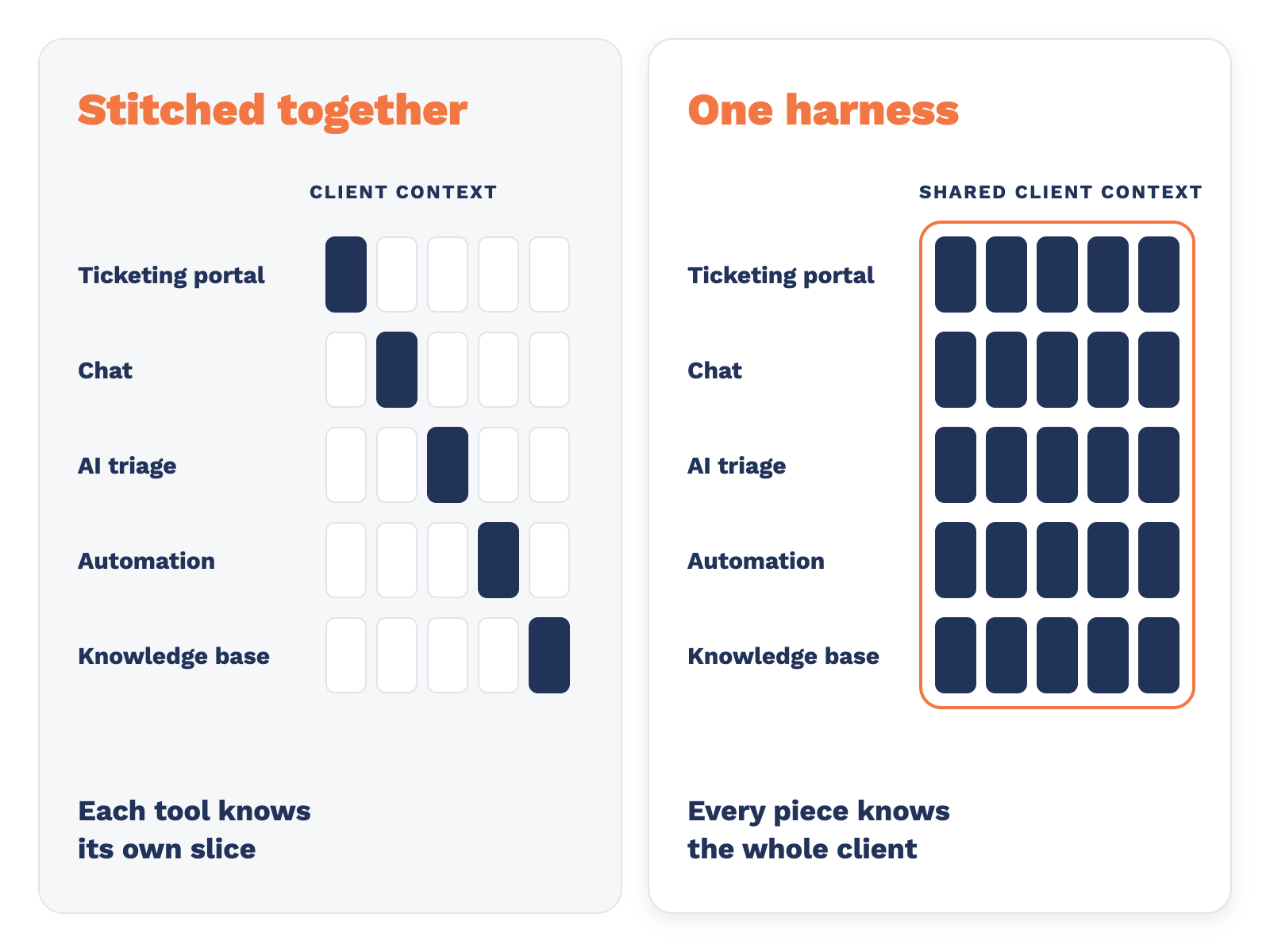
There must be 30 tools out there for ticket triage. Another 30 for automation. More for chat, portals, and knowledge bases.
Stitch them together and you get fragmentation, not a harness. Each tool knows its own slice. None of them knows the whole client.
The reason Claude and ChatGPT feel so useful is that you log in to one place and the harness is complete. It already knows what it needs to help you get to an answer. That's what most MSP service desks are missing.
That's the idea behind the CloudRadial platform. Each product covers part of the loop, and they're built to work together:
The goal is an agentic experience for your service desk where every piece is glued together, instead of one more tool added to the stack.
This is where general-purpose tools like Claude Cowork, ChatGPT, and n8n start to fall apart for MSPs. It's also where tools adapted from older approaches struggle to fit an agentic world.
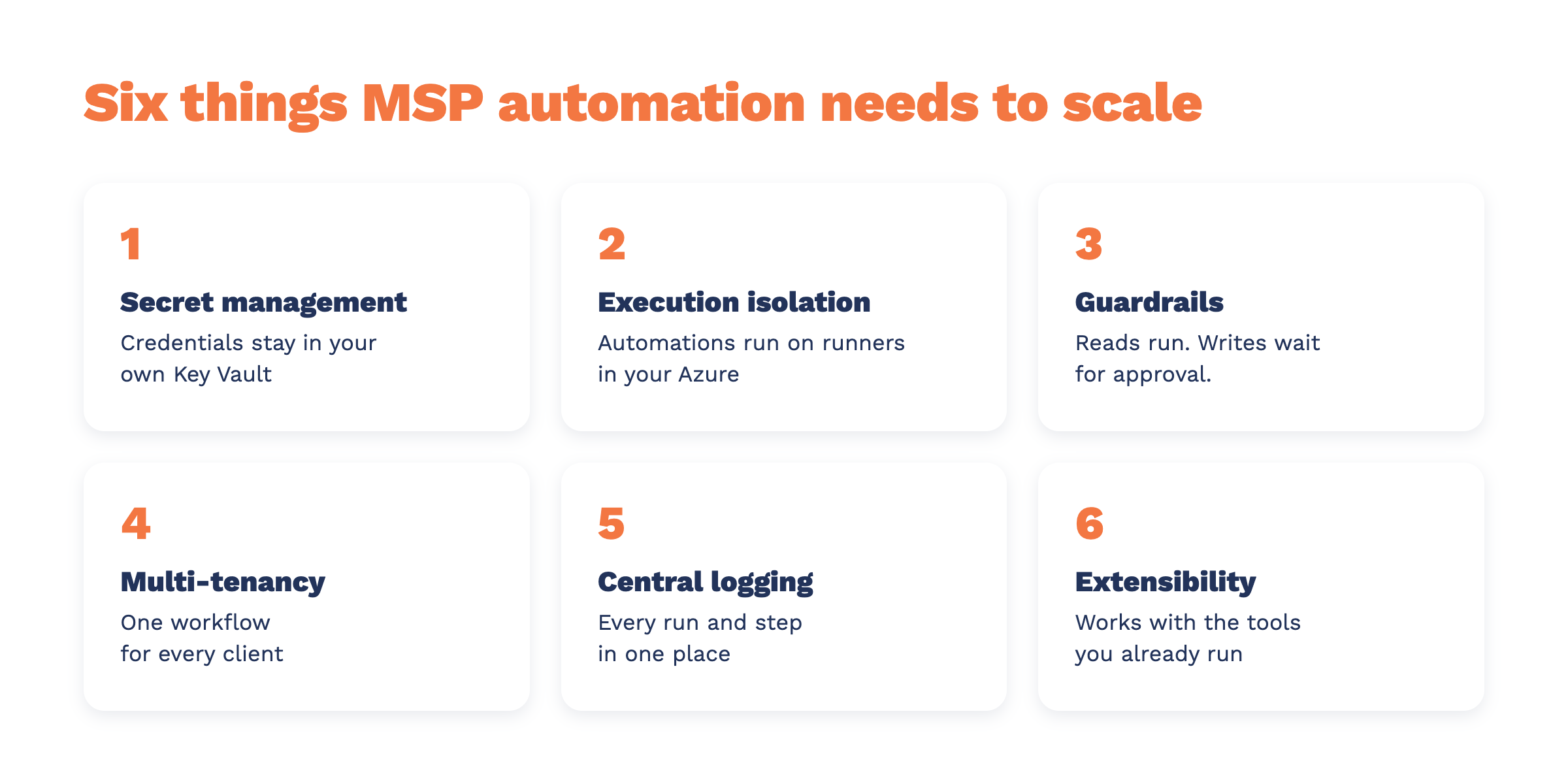
An automation platform holds the keys to your clients' systems. Put all of those secrets in one place and you've built a very tempting target. As Jeff put it, an attacker doesn't need to break into 2,000 Microsoft accounts if they can get them all from one spot. Recent breaches at MSP vendors have made that painfully real.
In AutomationAI, every MSP runs its own Azure Key Vault, inside its own Azure environment. When an automation runs, your secrets never touch CloudRadial's platform.
Nick showed this live. He'd been locked out of his own Key Vault because it's restricted by firewall and access controls. He had to add his own IP address before he could get in.
You also decide who owns the vault. Access to the Key Vault is managed by your organization, separately from who can run automations. Your techs can execute workflows without ever seeing a credential.
You can run automations on a Mac mini. Or a laptop. Or a dozen other places. What you really want is to know exactly where they run, what machine they run on, and what that environment looks like.
AutomationAI uses runners. Nick's analogy: a runner is your office building. You go there to work, and the work stays there. When you trigger a workflow, playbook, or agent, it doesn't run on CloudRadial's side. It runs on your runner, in your Azure tenant, on a private network with your Key Vault behind it.
A runner deploys from the Azure Marketplace. Jeff estimated the Azure cost at roughly $10 to $100 a month. Model usage on your runner bills at your AI provider's rates, so you aren't paying a markup on tokens. That adds up fast with agentic workloads.
Why run more than one runner? Nick and Ricky gave a few reasons:
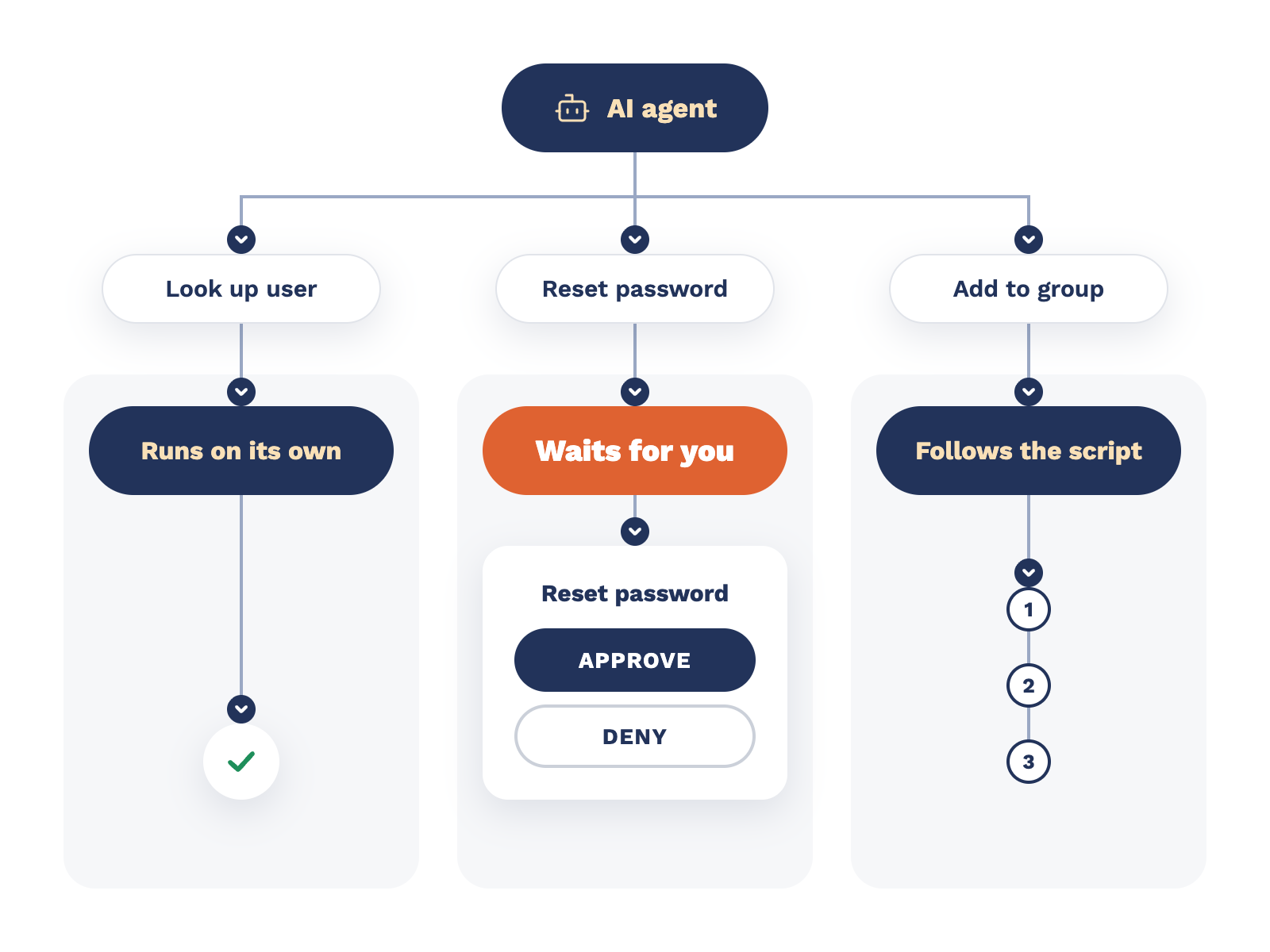
Agents are tenacious. Ask one to fix a user, and it might decide the fastest fix is to delete the user and recreate them, wiping out their data, history, and setup. Ask it to delete all users from a tool you've stopped using, and it may not realize you didn't mean your PSA.
Jeff's advice: put guardrails on every agentic effort, and use deterministic scripts like PowerShell or Python wherever you can. A script goes down the same path every time.
Here's how guardrails work in AutomationAI:
You set the risk tolerance, workflow by workflow. We went deeper on this in What Should an AI Agent Be Allowed to Do for Your MSP on Its Own?
One workflow for one client on one laptop works great. Fifty clients, each with their own authentication keys and their own rules, is a different job.
This is where most AI tools fall apart. OpenClaw and similar tools are built for a single user and a single tenant. The AI world is still in its personal productivity phase. Out of the box, Claude or ChatGPT won't handle a multi-tenant environment for you.
Ricky called this the biggest headache of the six, and used client portal forms as the example. Onboarding and offboarding forms seem simple. But 90% to 99% of each client's form is identical, and that last bit of variance is what kills you at scale. Security groups, Microsoft identifiers, proprietary software. With just 20 clients, there's a good chance you end up with 20 different forms. Add automations across Microsoft and other vendors, and the variances multiply.
AutomationAI handles this with Companies. You import or add your clients, then set tenant credentials for each one. When a form comes in from a specific client, the automation uses that client's secrets. You can also choose a company when you run an automation, and it runs directly against that client's credentials.
The result is one workflow that runs across every client, not one workflow per client. It's the same idea behind one onboarding form for every client.
If something changes in a client tenant, you need to know where the change happened and who made it. When 20 techs run automations from 20 laptops, nobody can say who did what, to which tenant, on which day.
AutomationAI logs every run in one place. A run shows as a big red failed or a big green succeeded, and you can open it to see every step and what it did. Nick noted that even non-programmers can follow most of it.
Fixing failures is fast. Nick copies the error from a failed step, opens that step, makes sure the right extension is set as context, and pastes the error into the AI. It corrects the script, sometimes after a try or two, and the workflow works.
Ricky's take: you should still know what an API is before you dive in, but the barrier to entry is much lower when the platform coaches you along. And because the log is shared, a failure isn't just your problem. Your team can help diagnose it.
At the end of a run, AutomationAI can now log the results back to a ticket, so the record lives in your PSA, too.
Most MSPs use a dozen to three dozen tools, and no two MSPs run the same stack. Your automation platform needs to work with all of them, plus whatever launches next year.
AutomationAI handles this a few ways:
Ricky compared it to the report archives in the client portal, where reports from any tool land in one place. Same idea, done as an adult. A platform that works with 9 out of 10 of your tools hamstrings you. You don't want your harness to fall apart because one tool isn't included.
Security and scale are table stakes. The bigger picture is how automations connect to the work, so nobody has to spend all day inside the platform clicking Run.
Nick walked through three ways to trigger an automation:
Then he showed it live. He submitted a portal form to add a CC to an existing ticket. The form fired a webhook to AutomationAI, and the workflow kicked off right away. With the new integration, the form maps its fields to the workflow's inputs, like the ticket number and the email address to add. It even tells you what those inputs should be, and confirms when nothing else is needed.
This is also why the portal's old automation module is being replaced with Actions, which connect portal forms to the rest of the platform more directly.
Ricky shared a moment from his own recent demo video: a password reset from the portal stopped because the account was an admin. That's the guardrail working the way you'd want. Admin password resets should wait for a person.
The vision goes beyond portal forms. The entry point can be anything: a third-party form, n8n, a chat, a ServiceAI trigger. Every entry point should feed the same loop, with shared context across the ecosystem so nobody has to re-explain, re-trigger, or re-enter keys.
As Jeff put it, users don't care whether an automation or a tech solved their problem. They want it resolved, quickly.
Ricky didn't want to end with a bait and switch. The honest answer is that the ecosystem matters most. The automation is the cheapest part now. What costs you is keeping it updated, secure, expandable, and relevant to client delivery, and accounting for every client's variables along the way.
Plenty of MSPs want to build this themselves first, and Ricky called that a good thing. If you can make it work, fantastic. If you find out how much work it takes, that's usually the moment it becomes a vendor's job. MSPs are starting to look more and more like SaaS companies, and it's worth asking whether the juice is worth the squeeze.
His two takeaways:
Already a CloudRadial partner? Talk to your account manager about where AutomationAI fits in your suite. If you're not sure who that is, email success@cloudradial.com.
This recap covers the highlights. The recording has the full walkthrough, including Nick's live demos of the Key Vault, runners, approvals, multi-tenant runs, and the run log, plus Jeff's breakdown of the service delivery harness.
Rewst, Pia, or AutomationAI: which one wins? That was the question behind our latest webinar. The honest answer: the automation itself matters less...
A user can't log in. Something's off with their account. You ask your AI agent to fix it.
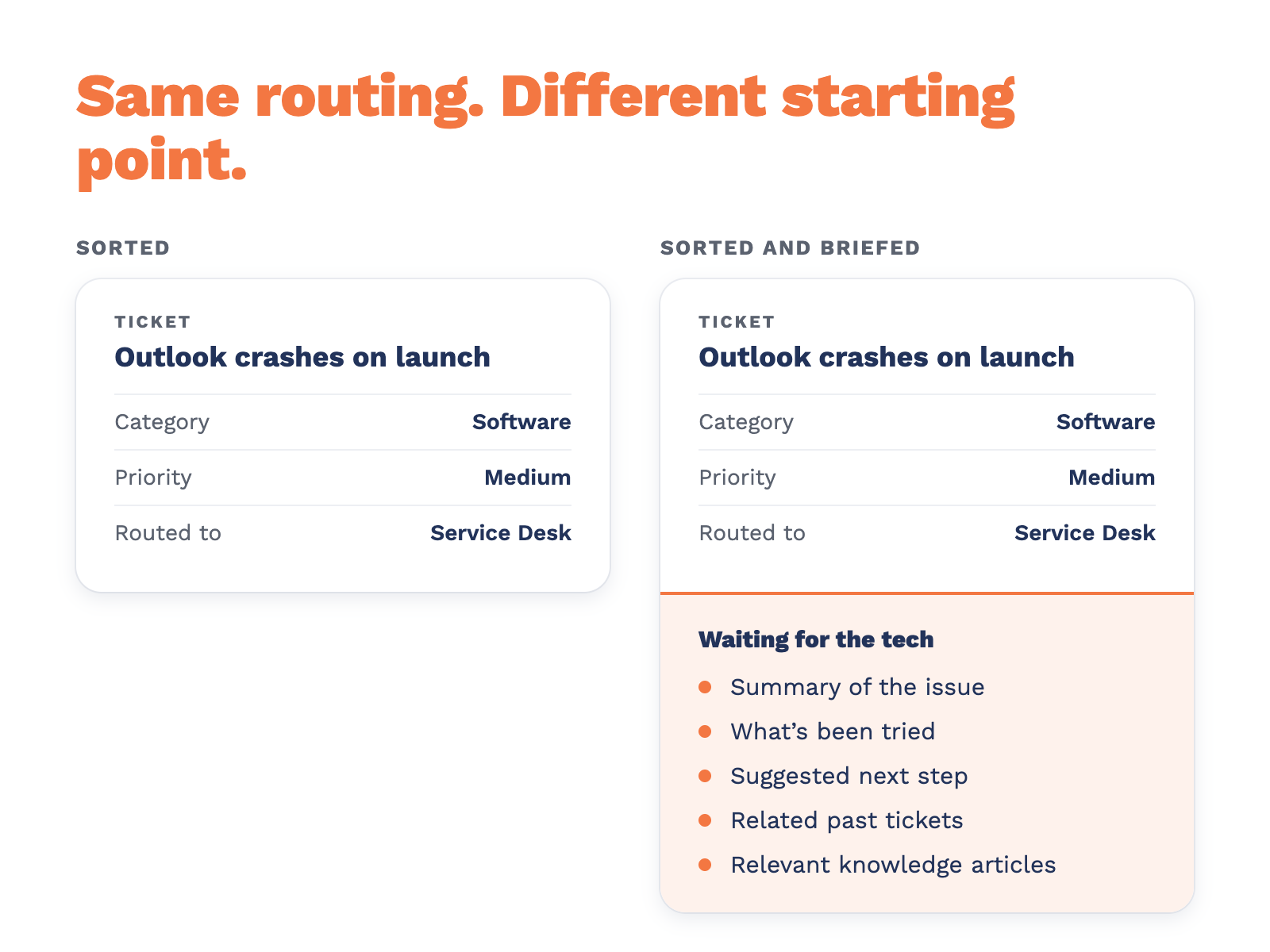
Most PSAs and service desk platforms can classify a ticket with AI now. Sorting is close to solved. The question worth asking in 2026 is what happens...