 CloudRadial
Co-Managed IT: How MSPs and Internal IT Teams Share One Client Experience
Co-managed IT used to be the deal you took when a prospect wouldn't let go of their in-house team. That's not where things stand now. Coverage of the...




Enterprise-grade infrastructure with the flexibility MSPs demand

Perfectly tailored AI that knows your specific MSP

Build your own Shopify-like store with your PSA products & distributors

Have clients to submit tickets directly to your PSA, freeing up your team's time

Pre-triage and route tickets correctly with the help of AI

Everything you need to start automating, no code required.
MSP client reporting is how a managed service provider makes its ongoing work visible to the client: the tickets handled, the endpoints and licenses managed, the security posture held, and the projects moving. Done well, it turns the quarterly business review from a slide deck assembled by hand into a living, shared picture of the relationship that the client can see any time. The payoff is retention. A client who can see the value is far harder to win away on price. CloudRadial UCP is the client-facing surface where that value becomes visible.
Most of what an MSP delivers is invisible by design. Patches land, threats get blocked, backups run, and tickets close, and if everything goes well, the client notices none of it. What they see is an invoice and the occasional support interaction. Then renewal arrives, and a year of quiet, competent work has to be recalled from memory in a single conversation. That is a weak position to negotiate from.
CloudRadial's 2026 State of AI in the MSP Industry report, a survey of more than 100 MSPs, puts the principle bluntly: a capability only creates client value if the client can see it. Work done silently in the background, however good, does nothing for retention or perceived value. Reporting is how the silent work becomes visible.
The market makes that visibility matter more. Kaseya's 2026 State of the MSP Report, drawn from more than 1,000 providers, found winning new customers is now the top challenge for 71% of MSPs, with buyers demanding clearer proof of value before they commit. When new logos are hard to win, proving your worth to the clients you already have is the cheaper growth.
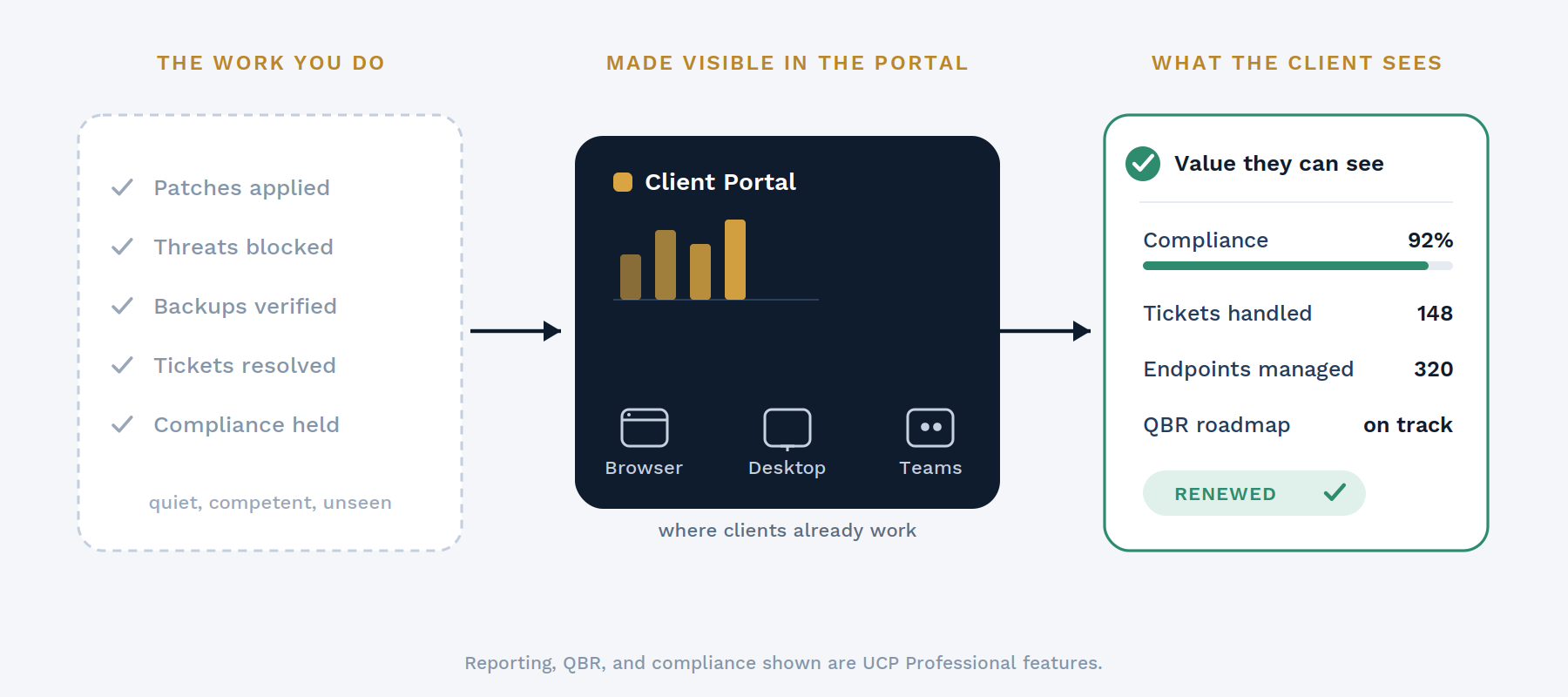
The job is to pull scattered evidence into one place a client can read. The proof of your work lives across the RMM, Microsoft 365, backup and security tools, and the PSA, in formats nobody outside your team ever sees. Good reporting consolidates it and turns it into something legible: on-demand QBR, inventory, and endpoint-aging reports; a compliance posture scored against a defined standard; and an evidence archive that collects the backup, antivirus, and security reports those third-party tools email out, then flags when an expected one fails to arrive, so "did the backup actually run?" has an answer instead of a shrug.
The best version is not a static document at all. It is a shared roadmap the client can look at whenever they want: what is going right, what is going wrong, and what you are doing about it. That shift, from a report you hand over to a surface you share, is what turns reporting from an obligation into a retention tool.
A perfect report nobody opens is worthless, and this is where most client reporting quietly fails. Reports should show up where clients already work: in a browser, in a desktop tray app, or embedded inside Microsoft Teams, branded as the MSP. The real competition is not another vendor's portal, it is Outlook, the default reflex a client reaches for when they need IT. A client-facing surface earns its keep by being where the client already is, not by asking them to remember one more URL and password.
Keep the audience clear too. The person reading a QBR and carrying it up to their own leadership is the client-side admin who owns the relationship, not the average end user. Report to that person, in their language, and the report does double duty: it justifies your invoice and it arms your champion inside the account.
For the account manager, the quarterly review is often days of manual assembly: exporting from one tool, screenshotting another, and stitching it into a deck that is stale the moment it is finished. When the underlying data already lives in one client-facing surface, that changes. The account manager builds on-demand PDF reports and works a shared planner, so prep drops from days to on-demand, and the review is anchored in a live, shared surface rather than a static slide dump. The QBR stops being a report-out and becomes a plan the client is bought into.
Reporting tells the client where things stand. AI helps you, the MSP, know which accounts to worry about before the QBR. CloudRadial ServiceAI, which is internal-facing, turns your ticket history into per-client analysis, trend lines, and early flags on accounts whose satisfaction may be slipping, so an account manager walks into a review already knowing where the risks are. Actual client satisfaction, when you collect it, flows in through integrations with tools like Smileback, Krew, and SimpleSat rather than a native survey. The honest split is worth stating plainly: ServiceAI predicts likely satisfaction from ticket signals, and the integrated tools collect the real thing.
UCP is the relationship surface of the CloudRadial suite: the branded, client-facing place where a client's tickets, requests, reports, invoices, shared planner, and compliance posture all live, reachable in a browser, on the desktop as a tray app, or embedded in Microsoft Teams. It integrates directly with ConnectWise Manage, Autotask, HaloPSA, Syncro, and Kaseya BMS, and pulls endpoint, license, and security data through a lightweight read-only agent or your existing RMM and Microsoft 365 integrations. It does not replace your PSA or RMM: it reflects their state back to the client and adds the request intake and value visibility on top.
The reporting, QBR, compliance, and planner capabilities described here are UCP Professional. And a portal worth showing a client takes a Jumpstart onboarding engagement to configure rather than a switch you flip: once it is set up, the reports are on-demand.
What is MSP client reporting?
It is how an MSP makes its ongoing work visible to a client: the tickets handled, assets managed, security posture maintained, and projects underway, consolidated into reports and reviews the client can actually read. The goal is proof of value, especially at renewal. CloudRadial UCP is the client-facing surface where that reporting lives, alongside the client's tickets, requests, and invoices.
What should an MSP QBR include?
A useful quarterly business review shows the state of the client's IT (endpoints, licenses, security, and compliance posture), the work delivered since the last review, and a shared roadmap of what is coming next. The strongest QBRs are anchored in a live surface both sides can revisit, not a slide deck that goes stale. In CloudRadial UCP, the account manager assembles on-demand reports and works a shared planner with the client, so the review is a living document.
How do I show clients the value of my MSP services?
Make the invisible work visible, continuously, in a place the client already looks. Rather than saving everything for one renewal conversation, keep tickets, reports, compliance posture, and the project roadmap visible year-round in a branded surface the client reaches from their browser, desktop, or Teams. CloudRadial UCP is built for exactly this: it is the relationship surface where an MSP's value stays on display.
Does better client reporting improve retention?
It helps, because value a client can see is value that is harder to walk away from on price. Reporting does not replace good service, but it makes good service legible at the moments that decide renewals. CloudRadial UCP keeps that value continuously visible to the client-side admin who owns the relationship and reports up to their own leadership.
Where should MSP client reports live?
Where the client already works, not behind a separate URL they have to remember. The most-used reporting surface is the one embedded in the tools clients already open every day: the browser, the desktop tray, and Microsoft Teams. CloudRadial UCP delivers reports across all three, branded as the MSP.
Is client satisfaction part of client reporting?
It can be, but attribute it correctly. Actual CSAT is collected through survey tools such as Smileback, Krew, or SimpleSat, which integrate with the portal; AI can predict likely satisfaction from ticket signals but does not measure it. In the CloudRadial suite, UCP integrates the tools that collect real CSAT, and ServiceAI contributes the predictive read for the MSP's own account-health view.
See what your clients could see. CloudRadial UCP turns the work you already do into a client-facing value story: on-demand QBRs, a shared roadmap, and compliance posture, all in the tools your clients already use. Book a walkthrough →
@2x.png)
Co-managed IT used to be the deal you took when a prospect wouldn't let go of their in-house team. That's not where things stand now. Coverage of the...
@2x.png)
Ticket triage doesn't get much attention. It's the work between a request showing up and someone actually fixing it, and it's easy to treat as a...
@2x.png)
You know the email. "Any update on this?" Four words, and it lands in the inbox of whoever is nearest the service desk.