 CloudRadial
Best AI Ticket Triage Tools for MSPs in 2026: The Six Types, Compared
Most PSAs and service desk platforms can classify a ticket with AI now. Sorting is close to solved. The question worth asking in 2026 is what happens...




Enterprise-grade infrastructure with the flexibility MSPs demand

Perfectly tailored AI that knows your specific MSP

Build your own Shopify-like store with your PSA products & distributors

Have clients to submit tickets directly to your PSA, freeing up your team's time

Pre-triage and route tickets correctly with the help of AI

Everything you need to start automating, no code required.
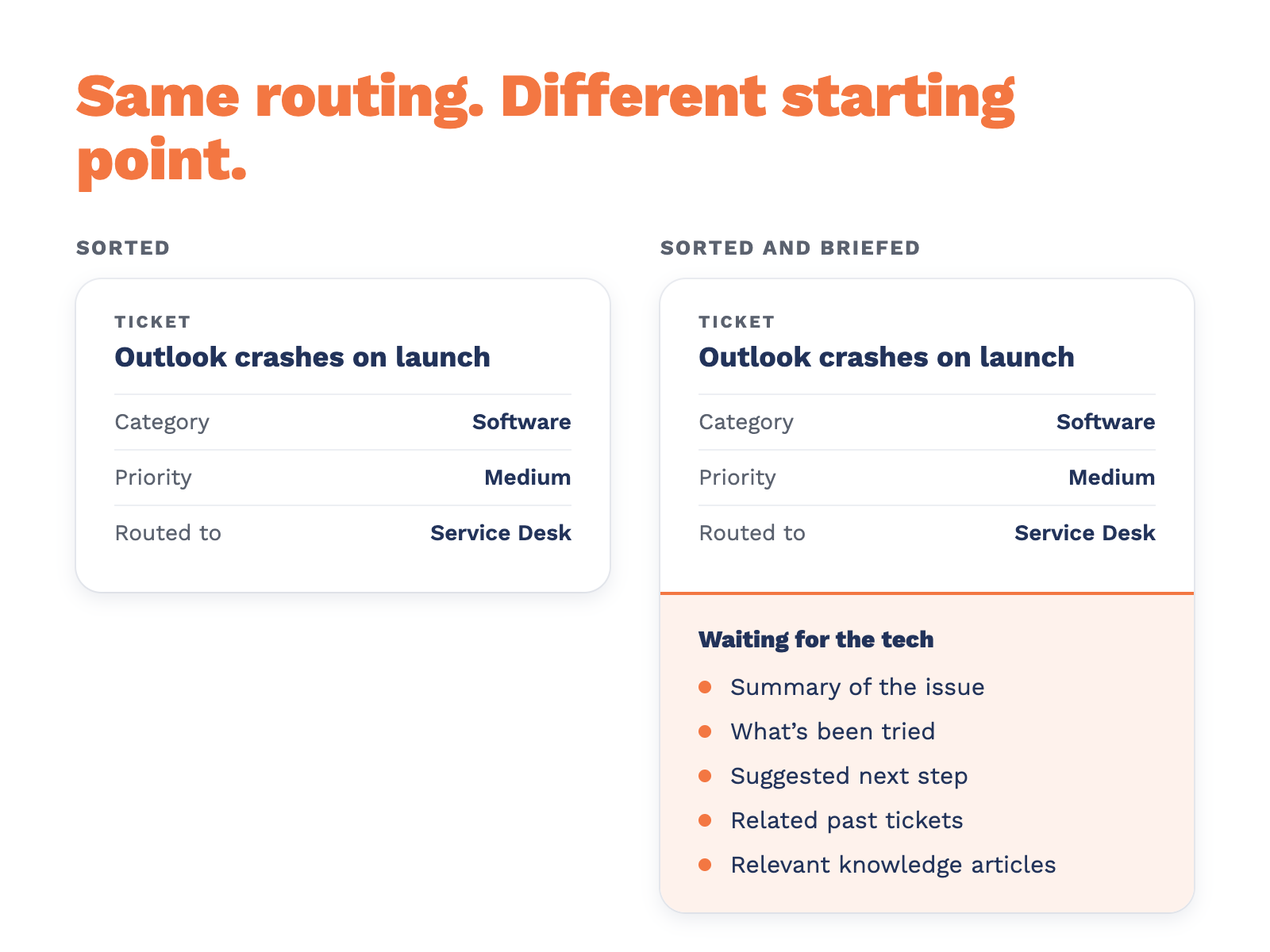
Most PSAs and service desk platforms can classify a ticket with AI now. Sorting is close to solved. The question worth asking in 2026 is what happens next. Does the tool route the ticket and step aside? Or does the technician who opens it already have the context, a likely cause, and a record of how your team handled the same problem last time?
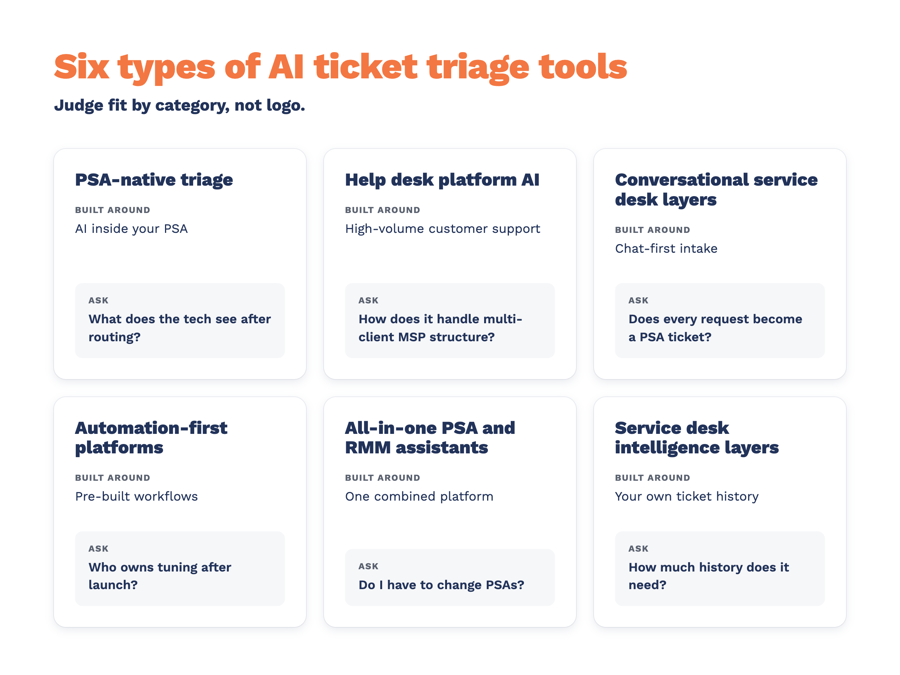
That’s where AI ticket triage tools for MSPs actually differ. This guide sorts the tools you’ll come across into six types, explains what each is built around, and gives you the questions to ask before you buy. Plenty of products straddle two of these, so use the category to judge fit, not the logo.
Before you compare categories, decide what you’re grading on. These are the questions that separate a tidy queue from a better service desk.
If you want the mechanics behind these criteria, our walkthrough of how AI ticket triage works for MSPs goes deeper.
Built around: AI classification inside the PSA itself, so triage can see contracts, SLAs, and asset records without a separate integration.
Where it shines: No new vendor, little setup, and many options start classifying right away.
Ask about: How much the AI draws on your own ticket history, what the technician sees beyond the routing decision, and whether coaching or documentation is in scope.
Good fit if: You want triage switched on inside the tool you already use, and your needs mostly stop at sorting.
Built around: High-volume customer support. Classification by topic, sentiment, and language feeds routing rules and SLA policies.
Where it shines: Mature classification, broad app marketplaces, and strong reporting on ticket trends.
Ask about: How it handles MSP structure (many clients, PSA boards, contracts), and which AI features are in the base plan versus add-ons.
Good fit if: Your support already runs on that platform, or your desk looks more like a single internal IT team than a multi-client MSP.
Built around: A chat-first front door in Teams, Slack, email, and sometimes phone, synced to your PSA.
Where it shines: Meeting end users where they already work and capturing requests fast.
Ask about: How a conversation becomes a ticket, what gets written to your PSA, and whether every request ends up as a record you can bill, report on, and measure against SLAs.
Good fit if: Your clients live in Teams or Slack, and phone and email intake is where things bog down.
Built around: Triage that kicks off pre-built workflows, often with visual rule builders and identity checks before sensitive steps.
Where it shines: Fast time to a first working automation for repetitive requests.
Ask about: Tuning and admin time after launch, and how much triage reflects your own history versus the rules you configure.
Good fit if: You have a backlog of repeatable requests and someone on the team to own the automations.
Built around: AI inside a combined PSA and RMM, so ticket and endpoint data share one view. Expect summaries plus event and time triggers.
Where it shines: Less tool-switching, and technicians can catch up on long ticket threads quickly.
Ask about: Whether the AI makes triage decisions or mainly assists, and whether moving your PSA is part of the deal.
Good fit if: You’re already thinking about consolidating PSA and RMM.
Built around: AI that sits over the PSA you already run and grounds its work in your resolved tickets and documentation.
Where it shines: Depth after routing: technician briefings, related past tickets, coaching evidence, and documentation drafts, without switching PSAs.
Ask about: How much history it needs, how your data is kept separate from other MSPs, and what it writes to your PSA and when.
Good fit if: You like your PSA and want your own history doing more of the work.
|
Type |
Built around |
Good fit when |
Ask before you buy |
|
PSA-native triage |
AI inside your PSA |
Sorting is the main need |
What does the tech see after routing? |
|
Help desk platform AI |
High-volume customer support |
Support already runs there |
How does it handle multi-client MSP structure? |
|
Conversational layers |
Chat-first intake |
Clients live in Teams or Slack |
Does every request become a PSA ticket? |
|
Automation-first platforms |
Pre-built workflows |
Lots of repeatable requests |
Who owns tuning after launch? |
|
PSA and RMM assistants |
One combined platform |
You’re consolidating tools |
Do I have to change PSAs? |
|
Intelligence layers |
Your own ticket history |
You want to keep your PSA |
How much history does it need? |
CloudRadial ServiceAI is a service desk intelligence layer. It triages tickets in your PSA, scores and coaches your techs, and points them to how your team has handled similar tickets before.
Triage you can watch before you trust it. When a ticket lands on a board you’ve chosen, ServiceAI checks it for spam and likely duplicates, can rewrite the subject, sets category and priority, and routes or assigns it based on rules you write in plain English. It records what it decided and why. Testing Mode lets you see every decision without writing anything to your PSA, and you pick which fields it’s allowed to change. Triage works with ConnectWise, Autotask, Kaseya BMS, HaloPSA, Syncro, and Zendesk, using each system’s own field names (field coverage varies by PSA). Triage volume depends on your tier: Professional includes a monthly triage allowance, and Enterprise is unlimited.
A briefing waiting on the ticket. Turn on the agent summary and the assigned tech gets an internal note with the issue, what’s been tried, a suggested next step, related past tickets, and relevant knowledge articles.
Grounded in your work. ServiceAI learns from your ticket history and documentation. Each MSP’s data stays separate, and there’s no shared model built across MSPs.
Coaching from evidence. Per-technician performance evaluations come from actual ticket data, so coaching conversations start from what happened rather than whoever you remember most recently. Treat them as input to a conversation, not a verdict.
Documentation from resolved work. ServiceAI drafts knowledge articles from resolved tickets for your team to review and publish.
What it doesn’t do. ServiceAI works on tickets that already exist in your PSA. It doesn’t create tickets, close them, or run fixes on endpoints. Your technicians make the call. It also works best with several months of recent ticket history and reasonably current documentation. If your documentation is thin, suggestions will be too.
Triage is only as good as the ticket it reads, which is where CloudRadial ChatAI comes in. End users ask for help in Teams, Slack, web chat, SMS, the CloudRadial portal, or Desktop Lite, and every conversation creates or updates a ticket in your PSA. On ChatAI Professional and Enterprise, the AI Responder interviews the user, summarizes the conversation, and writes a sharper ticket before your team picks it up. ChatAI works with ConnectWise, Autotask, Kaseya BMS, HaloPSA, and Syncro. The ticket stays the record of work, so it still counts toward SLAs, billing, and reporting.
Two products, two jobs, bought separately: ServiceAI makes the tickets in your PSA easier to work, and ChatAI makes asking for help easy. For how they sit alongside the rest of your stack, see MSP automation tools in 2026.
Interest isn’t the hard part. Omdia research reported by ITSM.tools found that seven in ten MSPs say they use agentic AI internally, while most haven’t put it into the service desk workflows where it would matter most. Closing that gap takes a business case your team believes, and that means your numbers, not a vendor’s.
Here’s a simple way to build one:
The MSP Roadmap to AI-Powered Service Delivery walks through each phase, from baselining your service desk to filling knowledge gaps and rolling out AI-assisted triage. Get the roadmap
AI ticket triage reads incoming tickets and handles the first-pass sorting a dispatcher would otherwise do: spotting spam and duplicates, setting category and priority, and routing to the right board or technician. For MSPs, the better tools also use your own ticket history to give technicians context. CloudRadial ServiceAI triages tickets in your PSA using plain-English rules you write and the history your team has built.
No. They take on repetitive sorting so people can spend time on work that needs judgment. Many MSPs keep a human in charge of assignment and let AI handle enrichment. With ServiceAI, you choose which fields triage can change and can start in Testing Mode before anything is written to your PSA.
Triage gets a ticket to the right place with the right details. Resolution is fixing the problem. Most triage tools help technicians resolve tickets faster rather than fixing things on their own. ServiceAI triages tickets and briefs technicians, and your team does the fixing.
Basic classification can start with very little. Suggestions grounded in your history get better with more of it. ServiceAI works best with several months of recent tickets and reasonably current documentation.
Most triage tools support the major MSP PSAs, but what they can update varies by system, so check field coverage for yours. ServiceAI triage works with ConnectWise, Autotask, Kaseya BMS, HaloPSA, Syncro, and Zendesk.
It depends on the vendor, so ask directly. With ServiceAI, each MSP’s data is kept separate, and there’s no shared model built across MSPs.
Most PSAs and service desk platforms can classify a ticket with AI now. Sorting is close to solved. The question worth asking in 2026 is what happens...
@2x.png)
A client can't get on the Wi-Fi after a router swap. Your tech walks them through it. Twenty minutes. Ticket closed.
@2x.png)
Here's a story you've probably lived.