 CloudRadial
Co-Managed IT: How MSPs and Internal IT Teams Share One Client Experience
Co-managed IT used to be the deal you took when a prospect wouldn't let go of their in-house team. That's not where things stand now. Coverage of the...




Enterprise-grade infrastructure with the flexibility MSPs demand

Perfectly tailored AI that knows your specific MSP

Build your own Shopify-like store with your PSA products & distributors

Have clients to submit tickets directly to your PSA, freeing up your team's time

Pre-triage and route tickets correctly with the help of AI

Everything you need to start automating, no code required.
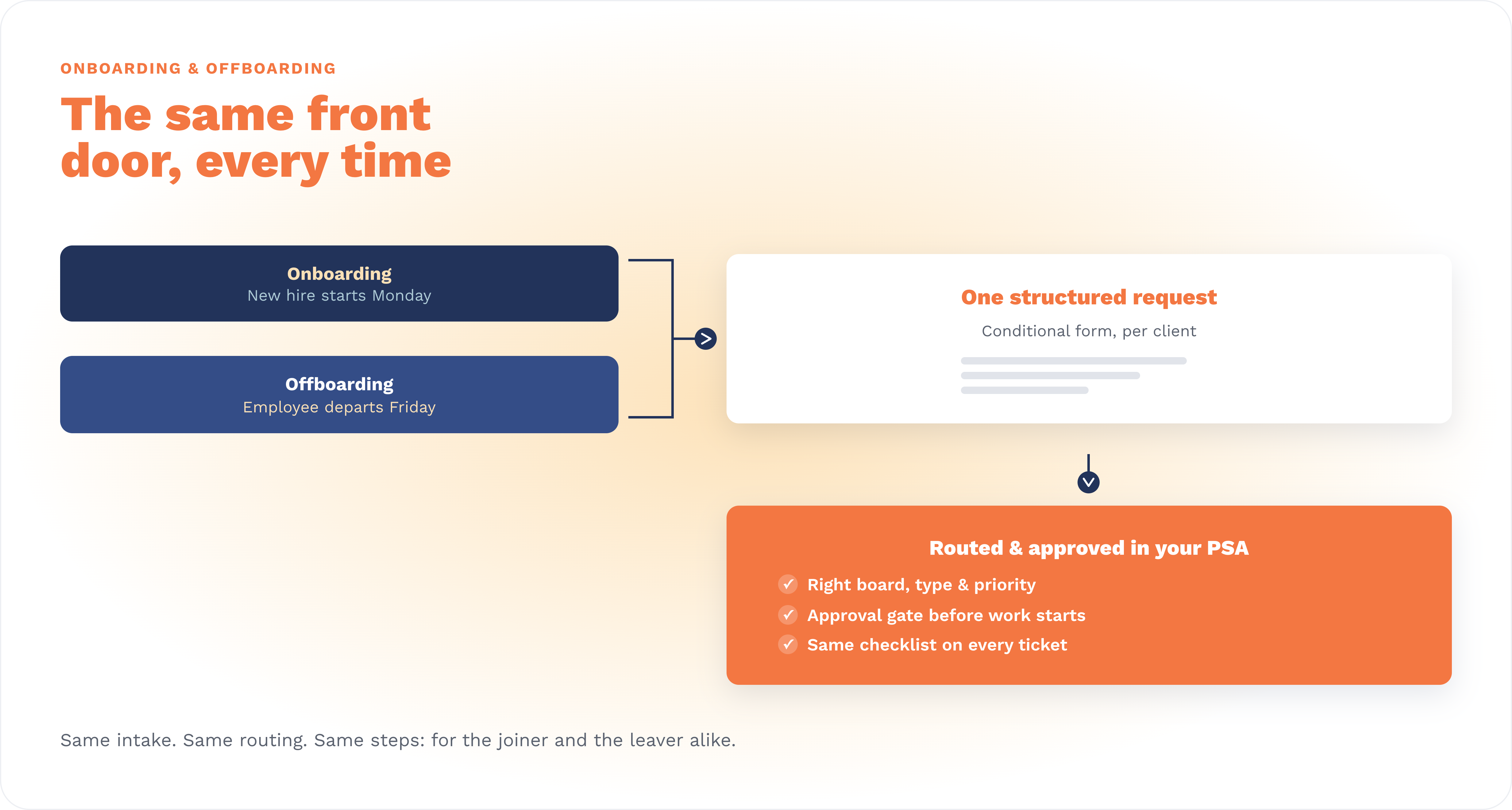
The reliable way to run client onboarding and offboarding is to standardize four things before automation runs anything: how the request comes in, where it goes, who signs off, and which steps get executed.
A structured intake form captures every detail up front, routing drops the request onto the right board in your PSA, an approval gate holds the work until it's authorized, and a shared checklist keeps every step consistent.
With that spine in place, an automation workflow can execute the provisioning or deprovisioning across your systems and record exactly what it did. The portal is the front door: the automation layer finishes the job.
CloudRadial pairs the two halves. Its Unified Client Portal (UCP) is the structured front door, and AutomationAI is the execution layer that acts across the systems you already run.
Almost every onboarding failure traces back to the same moment: the request arrives half-formed. "New employee starts Monday, can you set them up?" lands on a Friday afternoon with no mention of role, software, licensing, group membership, or hardware. Now a technician is guessing or chasing answers, and the clock is already running. Clients quietly judge your whole operation on how smoothly this one moment goes, even though it's a sliver of what you actually do for them.
Two problems show up over and over. The first is incomplete requests: a form with a hundred fields still fails if one required answer is missing, and now you're back to email and phone tag before work can start. The second is form sprawl: the MSPs who do solve intake often end up with a pile of near-duplicate forms, and maintaining them becomes its own full-time chore. Both are the MSP's burden, not the end user's.
It's worth being clear about where AI fits, because the instinct lately is to reach for a chatbot. Conversational AI is genuinely good at pulling detail out of a vague "something's broken" ticket. Onboarding and offboarding are a different shape of problem: a long, detailed questionnaire where asking one question at a time in a chat is tedious and easy to abandon. For this, a well-built form still wins. The goal isn't to replace the request with a conversation. It's to make the request complete, structured, and consistent, then let automation act on it.
Offboarding fails differently, and the stakes are higher. When someone leaves, the risk isn't a slow start: it's what quietly stays behind. Access that was never revoked, a license nobody reclaimed, a laptop that never came back, data with no clear owner. These gaps don't announce themselves the way a missed onboarding does. They surface in a security review, a true-up bill, or an incident, which is exactly when they're most expensive.
A process you can trust (and then automate) is built from four layers, in order:
Request forms, routing, and approvals are available on UCP Starter, so this baseline doesn't require the full platform.
The single biggest question MSPs ask about onboarding is variance. First name and last name are the same for every client you have. Everything interesting is not: the license sets, the Microsoft 365 groups, the hardware options, the apps. The wrong answer is a separate form per client, because a few hundred near-identical forms is a maintenance trap.
The better approach is one master form that flexes, built three ways at once.
Reusable question blocks let you define common sections (new-user details, account access, equipment) once and drop them into any form, so when a standard changes you update it in one place rather than editing every client's form by hand.
Conditional logic shows and hides questions based on earlier answers, keeping each form short and relevant.
And dynamic tokens turn a question into a variable that fills itself per client: instead of hand-typing each client's Microsoft 365 groups and licenses, the form can present that client's actual groups and licenses, pulled in automatically. The result is one form to maintain that still behaves as if it were custom-built for each account. Reserve a fully separate form only for the rare snowflake client whose needs are genuinely unlike everyone else's.
Want to build this hands-on? Watch the on-demand webinar, End-to-End Onboarding Forms: Build, Scale, Manage, for a working session on questions, conditionals, and dynamic per-client forms: https://youtu.be/4jJzLvur208
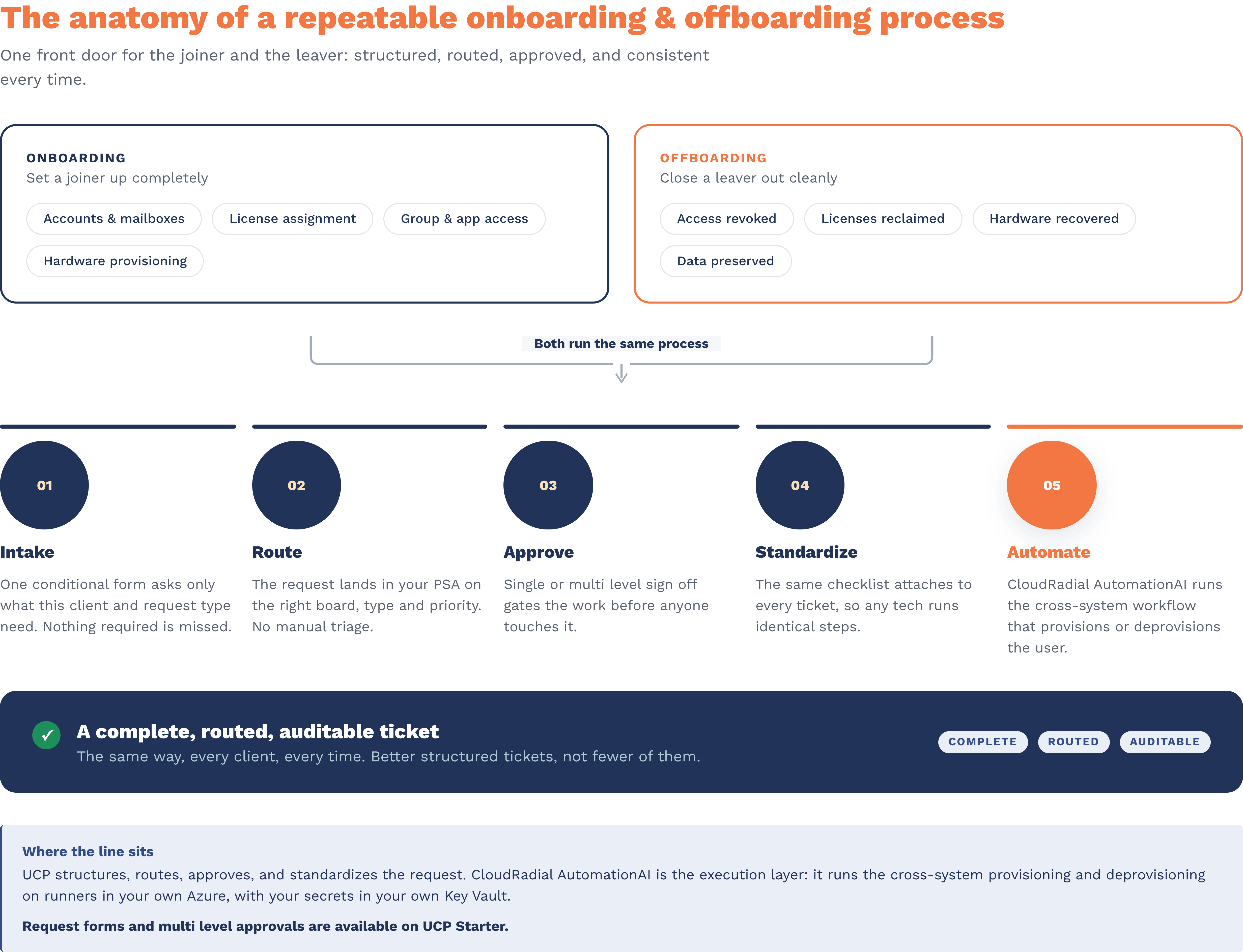
The instinct is to treat offboarding as onboarding in reverse, and structurally it is: the same layers, pointed the other direction. But the details are where MSPs get exposed, so offboarding deserves its own deliberate form. Customizing onboard and offboard forms to each client is one of the most common ways MSPs tailor a portal, precisely because the loops that need closing differ from client to client.
A good offboarding intake asks the questions that close the loops onboarding opened. Which access needs to be revoked, and by when? Which licenses come back into the pool? Does a mailbox get converted, delegated, or preserved for legal hold? Who inherits the departing person's files? Is there hardware to recover, and who's responsible for it? Conditional logic keeps this specific to the client and the role.
Two things make offboarding especially worth structuring.
First, approvals matter even more here: a security or manager sign-off on "revoke everything for this person" is exactly the kind of gate you want recorded.
Second, the audit trail is the deliverable. Because every step lives on a routed PSA ticket with its approval history attached, and because the execution itself is recorded (more on that next), "prove this person's access was removed" stops being an archaeology project and becomes a lookup.
Structure makes automation safe. Once a request is complete, routed, and approved, CloudRadial AutomationAI can take it the rest of the way. AutomationAI is the suite's execution layer: the product that acts across the systems an MSP already runs, from the PSA and RMM to documentation and Microsoft 365. When an onboarding form is submitted, it can trigger a workflow that provisions the new user across those systems in one consistent run. When an offboarding form is submitted, the mirror workflow revokes access, reclaims licenses, and closes the loops, then records exactly what it did.
Two properties make this more than a convenience.
First, it runs in your environment, not ours. Automations execute on runners you deploy into your own Azure subscription, and your credentials stay in your own Azure Key Vault. CloudRadial orchestrates the work but never holds your secrets or your data, and the runners reach out over HTTPS so nothing opens an inbound path into your network. For a task as sensitive as revoking a departing employee's access, that trust model matters.
Second, every run is recorded and every published version is immutable, so what ran is always reconstructable. That's the difference between staging a script for someone to run by hand and having the workflow execute end to end with a full, auditable record behind it.
Your technical team builds each workflow once, with connectors for the tools you run, then reuses it across clients. The division of labor stays clean throughout: the portal decides what needs to happen and captures it cleanly, and AutomationAI does it across your systems.
See how the execution layer works: https://www.cloudradial.com/automationai
Two cautions, because the word gets oversold in this category.
It should not mean fewer touches at the cost of a worse record. The goal of a structured onboarding request isn't to make the ticket disappear: it's to make the ticket better. A complete, approved, well-structured ticket is what lets work start immediately and what gives you something to audit later. Completeness and consistency are the win, not deflection.
It also should not mean instant. A repeatable process is built, not switched on. Your forms, routing, and checklists take intentional design, and the automation runs on infrastructure you provision. The payoff is real (onboarding stops being a Friday-afternoon fire drill, offboarding stops being a security liability), but it comes from doing that groundwork, not from flipping a switch.
There's a strategic reason to invest now. CloudRadial's 2026 State of AI in the MSP Industry report, which surveyed MSPs across 47 specific AI use cases, found that documentation-type use cases show 36 to 42 percent future intent against under 25 percent current adoption: the clearest untapped-opportunity signal in the data. The report's read is that first movers there aren't just saving time, they're building institutional knowledge competitors can't easily replicate.
A standardized onboarding and offboarding process is exactly that kind of institutional knowledge: the codified, repeatable version of how your MSP sets a client up and closes them out. Capturing it in structured forms, checklists, and workflows is how it compounds instead of living in one senior engineer's head.
How do you automate client onboarding and offboarding as an MSP?
Standardize the process before automating it. Use a structured intake form to capture every detail up front, route the request into your PSA automatically, gate it with approvals, and attach a consistent checklist. Then let an automation workflow execute the provisioning or deprovisioning across your systems, acting on a request that already has everything it needs.
How do you handle onboarding forms when every client needs something different?
Don't build a form per client. Build one master form from reusable question blocks, use conditional logic to show only the questions that apply, and use dynamic tokens to fill client-specific options automatically, such as each client's actual Microsoft 365 groups and licenses. You maintain one form instead of hundreds, and reserve a fully separate form only for the rare client whose needs are genuinely unlike everyone else's.
Should onboarding intake be a form or an AI chatbot?
For onboarding and offboarding, a form. These are long, detailed questionnaires, and collecting them one question at a time in a chat is tedious and easy to abandon. Conversational AI is well suited to a vague "something's broken" ticket; a structured new-hire or departure request is better served by a form that shows only what's relevant and lands complete.
What does CloudRadial AutomationAI do in onboarding and offboarding?
AutomationAI is the execution layer. When a UCP request form is submitted, it can trigger a workflow that provisions or deprovisions the user across the systems you run. The workflow executes on runners in your own Azure environment, with your credentials in your own Key Vault, and records every run so you can prove what happened.
Do these forms create more tickets or fewer?
The aim isn't fewer tickets: it's better ones. A structured request produces a complete, well-organized ticket that a technician can act on immediately and that you can audit later, which is far more valuable than a reduced count of vague ones.
Turn your messiest onboarding form into a process that runs itself. In a 30-minute demo, we'll take the onboarding or offboarding form you're least proud of, show you what it looks like with conditional logic doing the asking, and walk through how AutomationAI executes the rest: Book a demo → https://cloudradial.com/demo
@2x.png)
Co-managed IT used to be the deal you took when a prospect wouldn't let go of their in-house team. That's not where things stand now. Coverage of the...
@2x.png)
Ticket triage doesn't get much attention. It's the work between a request showing up and someone actually fixing it, and it's easy to treat as a...
@2x.png)
You know the email. "Any update on this?" Four words, and it lands in the inbox of whoever is nearest the service desk.