Co-Managed IT: How MSPs and Internal IT Teams Share One Client Experience
Co-managed IT used to be the deal you took when a prospect wouldn't let go of their in-house team. That's not where things stand now. Coverage of the...




Enterprise-grade infrastructure with the flexibility MSPs demand

Perfectly tailored AI that knows your specific MSP

Build your own Shopify-like store with your PSA products & distributors

Have clients to submit tickets directly to your PSA, freeing up your team's time

Pre-triage and route tickets correctly with the help of AI

Everything you need to start automating, no code required.
4 min read
CloudRadial ServiceAI is purpose-built AI for MSPs, trained on your tickets, your clients, and your solutions.
Get accurate support suggestions, automated ticketing triage, tech visibility, and more.

I'll be honest with you—this is one of my favorite features to demo. After years of working with MSPs, I've seen countless tools that promise to revolutionize the service desk. Most require extensive setup, constant tweaking, and a team of experts to maintain. ServiceAI's ticket triage is different. It's one of those rare features that genuinely works right out of the box and delivers immediate, tangible value.
There's something I call the "client friction formula"—and yes, I know I need a better name for it. There's an inverse relationship between the complexity of your ticket submission forms and client adoption. The more fields you require, the more hoops clients have to jump through, the less likely they are to complete the form properly.
But if you give clients a blank form that just says "describe your issue," you get tickets like "help" and "broken." Then you're stuck playing 20 questions to get the information you need.
Triage solves this dilemma. You can simplify your client-facing forms—maybe just a dropdown for the general category and a description field—and let ServiceAI handle the detailed classification on the backend. Your clients get a frictionless experience, and you get properly categorized, routable tickets.
A lot of tickets coming into MSP service desks have generic, unhelpful subject lines. You know the ones I'm talking about—"Computer issues," "Help," "Not working."
When you feed a well-detailed ticket into an AI model, the results are incredible. The AI knows exactly what's going on and can provide targeted assistance.
But when you get a ticket that just says "computer issues"? The AI is going to spit out something generic because it doesn't have enough context to work with.
That's why we're fixing that.
Triage handles the complete first-pass ticket processing that typically falls to a dispatcher or service desk manager.
ServiceAI analyzes every incoming ticket and instantly:
Filters spam before it hits your board/queue
Routes to the right queue/board based on your rules, content and context
Categorizes by subtype, type or other sub-options
Sets priority levels using keywords and urgency signals
Updates the fields you've specified
Recommends the best technician based on expertise
And it does all of this in about 10-20 seconds.
We've done the math what manual triage actually costs you:
38 hours per week (5-person team) in lost productivity
$78,000 annually in billable time spent on administrative work
Slower response times leading to frustrated clients
Tech burnout from your best people drowning in busywork
Missed SLAs because urgent tickets got buried
At $295/month (or $595/month for Enterprise), ServiceAI costs a fraction of one tech's salary. And it works 24/7 without getting tired, making mistakes, or needing time off.
Here's what makes this so easy: it requires virtually no setup, saves 2-3 minutes per ticket, and the value is immediately clear. During my onboardings, I typically get MSPs up and running with triage in 10-15 minutes. Compare that to other automation tools that can take weeks to configure properly.
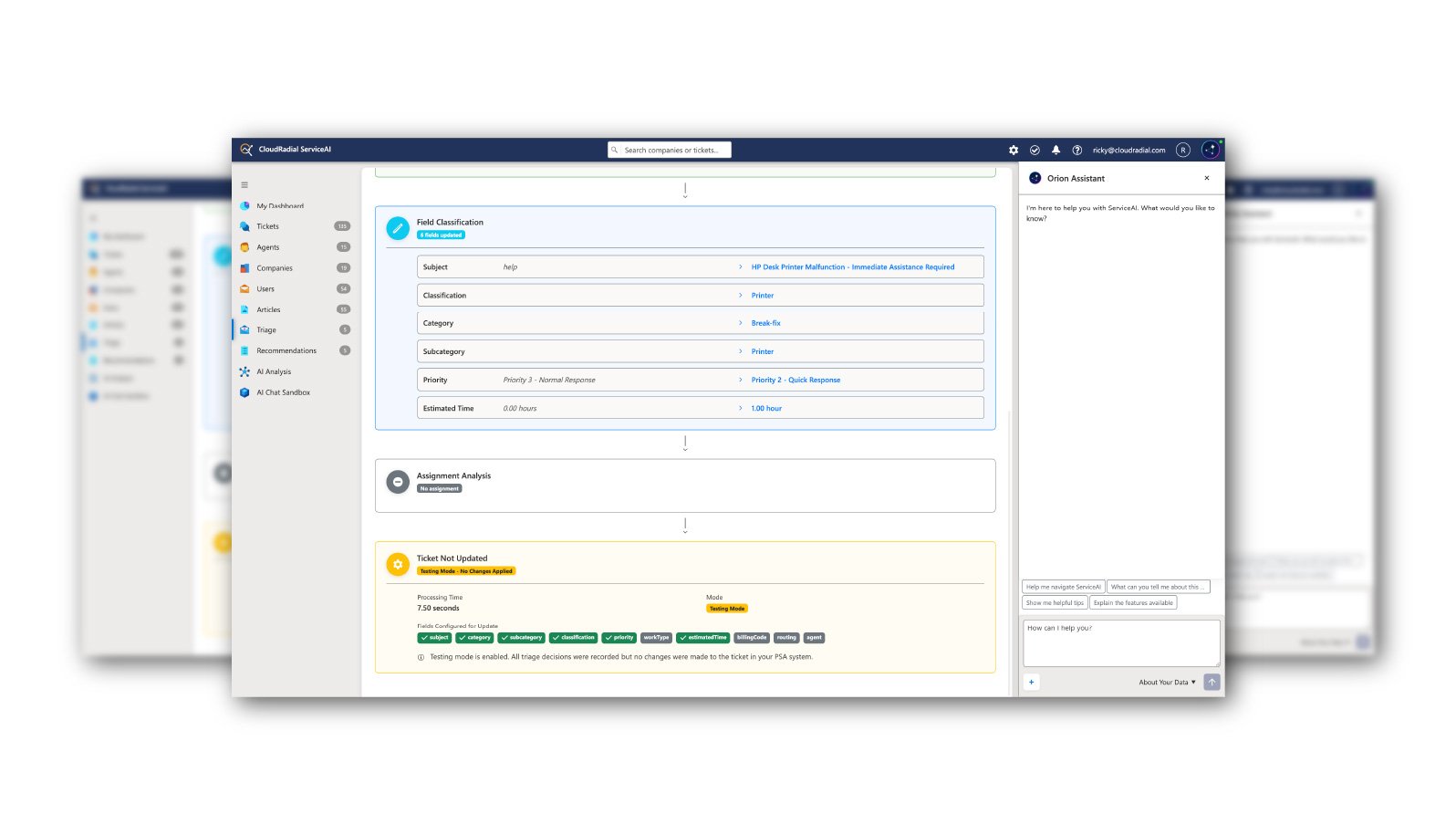
Let me walk you through a real example from a recent demo. A ticket came in with the subject line "Not working" and the description mentioned "M365 Outlook isn't working on the web." Within 10 seconds, ServiceAI had:
The ticket went from useless to actionable without any human intervention.
One of the things I love most about triage is how you correct it. No complex mapping, no API calls, no configuration files. You just talk to it like a human being.
Let's say the AI categorized a phone ticket as "Hardware > Other" but you have a specific "Cell Phone" category you prefer. You simply add a categorization rule that says: "Phone tickets should go under Cell Phone, not Hardware." That's it. Plain English instruction, and the AI adjusts its behavior immediately.
I've seen MSPs write rules like:
The AI understands these instructions and applies them consistently, every single time.
Here's a fun one. We built in spam detection, and it's surprisingly good. I tested it during a recent demo by creating a ticket with a classic Nigerian prince email. Within 18 seconds, ServiceAI had flagged it with 99% confidence (the AI never hits 100%, but 99% is essentially its way of saying "definitely spam") and routed it to the spam queue.
The practical application here isn't just catching obvious phishing attempts. Many MSPs use this for sales queues that get inundated with junk requests. Having triage scrape away the garbage and surface the legitimate sales opportunities saves significant time and ensures nothing valuable gets lost in the noise.
I know what you're thinking: "This sounds great, but what if it makes a mistake and messes up my PSA?"
That's why we built test mode. When you first turn on triage, it runs in test mode by default. You can see exactly what the AI would do—what it would rename, how it would categorize, where it would route—without it actually touching your tickets.
You let it run for a while, review the decisions it's making, adjust your rules as needed, and only turn off test mode when you're confident it's behaving the way you want. This calibration period is crucial, and it typically only takes a day or two of monitoring to dial everything in.
I've been running onboardings for ServiceAI for about a month now with roughly 100 MSPs, and the feedback on triage has been consistently positive. MSPs are seeing:
One MSP told me that triage alone justified the cost of ServiceAI, and everything else—the insights, the technician assistance, the analytics—was just bonus value on top.
Tickets come in messy and leave organized. Customers get faster responses. IT managers get visibility into every tech's performance. Even support documentation can be auto-generated. And remember, ServiceAI gets smarter every day because it's learning from your MSP environment.
AI is reshaping the MSP industry. Not by replacing people, but by handling the grunt work that bogs people down.
Here's the deal: we have a 60-day money-back guarantee. And for January and February 2026, we're waiving the onboarding fee. To see which plan works best for you, visit our pricing page and jump right in.
You can also book a demo at cloudradial.com/demo instead. But really, you should just try it.
@2x.png)
Co-managed IT used to be the deal you took when a prospect wouldn't let go of their in-house team. That's not where things stand now. Coverage of the...
@2x.png)
Ticket triage doesn't get much attention. It's the work between a request showing up and someone actually fixing it, and it's easy to treat as a...
@2x.png)
You know the email. "Any update on this?" Four words, and it lands in the inbox of whoever is nearest the service desk.