 CloudRadial
Co-Managed IT: How MSPs and Internal IT Teams Share One Client Experience
Co-managed IT used to be the deal you took when a prospect wouldn't let go of their in-house team. That's not where things stand now. Coverage of the...



Enterprise-grade infrastructure with the flexibility MSPs demand

Perfectly tailored AI that knows your specific MSP

Build your own Shopify-like store with your PSA products & distributors

Have clients to submit tickets directly to your PSA, freeing up your team's time

Pre-triage and route tickets correctly with the help of AI
Everything you need to start automating, no code required.
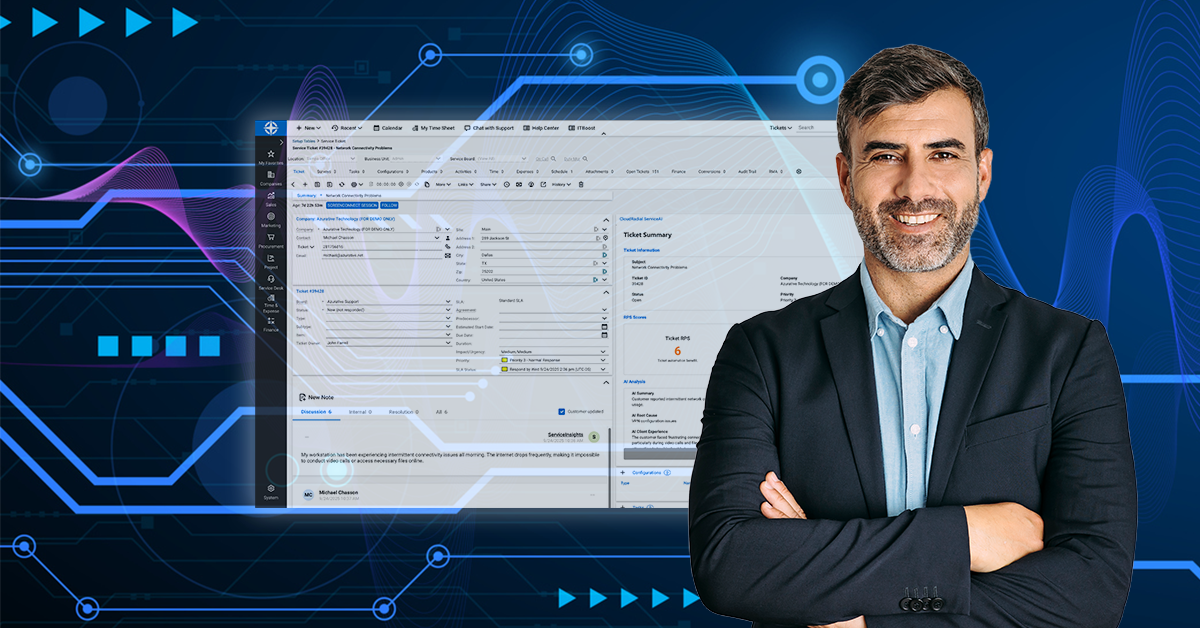
The managed services industry is at an inflection point. Client expectations are rising, technical complexity is increasing, and the traditional model of "throw more techs at the problem" isn't sustainable. AI-powered service delivery represents a fundamental shift in how MSPs operate—not by replacing humans, but by making every aspect of service delivery smarter, faster, and more consistent.
This guide explains what AI-powered service delivery actually means for MSPs, why it matters now, and how to implement it successfully. Whether you're just beginning to explore AI or already testing tools, you'll find frameworks, benchmarks, and practical insights to help you build operational intelligence into your service desk.
In this article:
The economics of managed services are changing. A 2025 study of 181 MSPs found that while 76% expect revenue growth this year, only 6% are achieving best-in-class performance across all five critical service delivery metrics:
The gap between top performers and average MSPs isn't just about revenue—it's about how efficiently they deliver services.
MSPs face a fundamental tension: clients want faster response times and more consistent service, but traditional solutions (hiring more technicians) erode margins and create new management complexity.
This creates three core problems:
Scalability bottlenecks. Manual processes that work for 500 endpoints break down at 2,000. Hiring more techs increases costs linearly while revenue grows sub-linearly, eventually making growth unprofitable.
Consistency challenges. Different techs solve the same problem differently. Knowledge lives in people's heads rather than accessible systems. New hires take months to reach full productivity because there's no effective way to transfer institutional knowledge.
Operational inefficiency. MSPs spend significant time on tasks that don't require human expertise—reading tickets to understand issues, searching for documentation, figuring out who should handle what. This creates burnout and prevents techs from focusing on complex, valuable work.
AI-powered service delivery isn't about chatbots or automating away your techs. It's about building operational intelligence into your service desk workflows so every ticket gets handled better.
In practice, this means AI analyzes incoming tickets to understand what they're about, routes them to the right person, identifies urgency, pulls relevant documentation, and adds context—before any human looks at them. When techs open tickets, they're looking at issues that have already been triaged, categorized, and prepped with the information needed to resolve them efficiently.
This operational intelligence compounds over time. Better documentation leads to faster resolutions. Faster resolutions create more documentation. More documentation makes the AI smarter. The entire system gets better with every ticket you handle.
According to recent MSP research, the fastest-growing MSPs share a common trait: they achieve best-in-class performance across multiple service delivery KPIs. Among MSPs that meet or exceed all five critical service delivery benchmarks, 50% project high growth (above 10% MRR increase) compared to just 37% of all MSPs overall.
This isn't coincidental. MSPs building intelligence into their operations can handle more clients with the same team size, deliver more consistent service, and scale without sacrificing quality. While competitors are still manually triaging tickets and searching for documentation, AI-powered MSPs are resolving issues and moving on to the next problem.
The window for differentiation is closing. As AI adoption accelerates—40% of MSPs are already using AI for automation according to industry surveys—the competitive advantage shifts from "we have AI" to "we've built AI into our operational foundation and refined it over time."
Learn more:
The gap between AI experimentation and AI transformation is wider than most MSPs realize. While many are testing AI tools, few are seeing meaningful, sustained improvements in service delivery.
Most MSPs treat AI like any other software tool: sign up, test a few features, see if it helps. This works for point solutions like backup software or password managers, but it fails with AI because AI should fundamentally change workflows, not just automate individual tasks.
Here's what typically happens: An MSP enables an AI feature—maybe automated email responses or a chatbot. It works okay for simple issues but struggles with complexity. Techs don't trust it fully, so they double-check everything, which takes more time than doing it manually. After a few weeks, usage drops off and the AI gets labeled "not ready yet."
Unlike generic AI, AI for MSPs needs three things to work well:
1. Training on your specific environment. Generic AI doesn't know your clients, your configurations, or your standard procedures. It needs to learn from your documentation, ticket history, and resolution patterns before it can make smart decisions about your service desk operations.
2. Workflow redesign. AI changes how work flows through your organization. Tickets that used to go straight to techs now get pre-processed. Documentation that techs used to create manually now gets assisted by AI. These changes require rethinking how your service desk operates, not just adding a new tool.
3. Time to optimize. AI gets better with use. Early performance might be 70% accurate, which feels frustrating. But with refinement—adjusting routing rules, improving documentation, training techs on working with AI—that 70% becomes 90%, then 95%. MSPs that quit early never see this improvement curve.
Successful AI adoption moves through three distinct stages, and trying to skip stages leads to failure.
Stage 1: Tricks. Using AI for isolated tasks like generating ticket notes or drafting email responses. These "tricks" save a few minutes here and there but don't fundamentally change how you operate. They're valuable for learning how AI works and building team comfort, but they're not transformation.
Stage 2: Tools. AI gets integrated into specific workflows. Maybe you're using AI to automatically categorize tickets or suggest knowledge base articles. The AI is doing meaningful work, but it's still operating within your existing service desk structure. This stage delivers real efficiency gains and starts creating compound benefits as documentation improves.
Stage 3: Transformation. AI becomes part of your operational foundation. Ticket triage is fully automated. Documentation generation becomes routine. AI routes work based on tech expertise and workload. The entire service desk is designed around AI-enhanced operations, not retrofitted with AI features. This is where major performance improvements and scalability gains happen.
MSPs who succeed with AI follow a consistent pattern: they start with internal operations before client-facing features, they give AI time to learn and improve, they measure results with appropriate metrics, and they redesign workflows around AI capabilities rather than just adding AI to existing processes.
Learn more:
Understanding AI in abstract terms is one thing. Seeing what it looks like in practice is another. Here are the key operational areas where AI creates measurable improvements for MSP service desks.
Manual ticket triage is one of the most expensive hidden costs in service delivery. Every ticket requires someone to read it, understand the issue, determine urgency, figure out who should handle it, and route it appropriately.
How AI changes this: AI-powered ticket triage uses natural language processing to read incoming tickets, understand what they're about, and make routing decisions in seconds. Instead of waiting in a queue for someone to read and categorize them, tickets get processed immediately.
Here's what this looks like in practice: A ticket comes in saying "Can't connect to VPN from home, getting error 809." AI recognizes this as a networking issue, identifies it as business-impacting (remote access down), checks which techs have VPN expertise and current availability, routes it to the appropriate person, and adds an internal note with relevant context and suggested troubleshooting steps.
The tech opens a ticket that's already categorized, prioritized, and comes with relevant context. Resolution time drops because the grunt work is already done.
Real-world impact:
Traditional service desk metrics tell you how many tickets each
tech closed or how long resolutions took, but they don't tell you whether tickets are being resolved correctly, whether documentation is being created, or whether techs are following best practices consistently.
How AI provides insight: AI-powered service desks track diff
erent, more meaningful metrics through systems like Relative Performance Scores (RPS). Instead of just counting closed tickets, RPS evaluates:
This creates a different kind of visibility—not micromanagement of individual techs, but operational intelligence about where your team needs support, where training would help, and where your processes can improve.
Example: RPS analysis might reveal that tickets assigned to Tech A get resolved faster than average but have lower quality scores, suggesting quick fixes that don't fully address issues. Or that Tech B rarely references knowledge base articles, indicating either strong expertise or lack of engagement with documented procedures.
One of the biggest challenges in service delivery is consistency. Different techs solve the same problem in different ways. Solutions that worked well get forgotten if the tech who created them leaves. New hires take months to build up knowledge that senior techs have accumulated over years.
How AI solves this: AI creates a bridge between your documented knowledge and actual ticket resolution. When a ticket comes in, AI identifies similar past issues, pulls relevant knowledge base articles, and suggests solutions that have worked before—making your best practices accessible to everyone, not just senior techs.
Critical clarification: AI suggests responses and solutions. Technicians review, edit, and decide what to send. The human remains in control of all customer communication. AI provides assistance, not automation.
Example: A junior tech gets a ticket about slow database performance. Instead of guessing or escalating immediately, they open a ticket that AI has already analyzed. The AI has identified similar tickets from the past six months, pulled the relevant knowledge base article on database maintenance, and noted which solutions worked in previous cases.
The junior tech has everything they need to resolve the issue using proven solutions. They're not inventing new approaches or making educated guesses—they're applying your organization's accumulated expertise.
Documentation is critical but time-consuming. Techs finish resolving tickets and either skip documentation entirely, write minimal notes, or spend precious time on detailed write-ups.
How AI assists: AI can help generate documentation from ticket resolutions. When techs identify tickets that should become knowledge base articles, they can use AI to create structured drafts based on the ticket content—including issue description, resolution steps, relevant configuration details, and related articles.
Example workflow:
Real-world impact: Your knowledge base grows strategically based on actual gaps identified through ticket analysis. Documentation quality stays consistent. New techs have access to proven solutions formatted for easy reference.
Beyond individual tickets, AI provides visibility into service desk operations through dashboards and analysis tools:
This transforms raw ticket data into actionable intelligence for improving service delivery.
Download our free guide:
The MSP's Roadmap to AI-Powered Service Delivery with CloudRadial ServiceAI

This comprehensive roadmap shows you exactly how to implement AI in your service desk over 90 days—with weekly action steps, common pitfalls to avoid, and frameworks that create real results.

Understanding what AI can do is different from knowing how to implement it successfully. The most effective approach is structured, phased, and starts with internal operations before expanding to client-facing capabilities.
Based on analysis of successful MSP AI implementations, effective adoption follows a three-phase structure over approximately 90 days.
The first phase is about preparation and baseline establishment. You can't measure improvement without knowing where you started, and you can't train AI without giving it data to learn from.
Key activities:
Audit your current ticket data to identify patterns, common issues, routing flows, and areas for improvement. Look at how long triage takes, how often tickets get reassigned, where escalations happen, and which types of issues take longest to resolve.
Document your existing workflows in detail. How do tickets currently flow through your organization? Who handles what? What are your escalation procedures?
Establish baseline metrics across critical service delivery KPIs: average Level 1 resolution time, first contact resolution rate, technician utilization rate, SLA compliance rate, and customer satisfaction score.
Configure your AI system to understand your environment. This means importing your documentation, configuring routing rules based on your service desk structure, setting up categorization that matches your reporting needs, and allowing the system to analyze your ticket history.
Important: During this phase, you're not going live yet. You're building the foundation that makes your eventual rollout successful.
Phase two is where your team starts working with AI in a controlled environment. You're using AI for internal operations—ticket triage, documentation, knowledge management—but you're not exposing it to clients directly yet.
Key activities:
Enable AI triage in testing mode where AI makes suggestions that dispatchers or techs review before applying. This lets you see how AI would route tickets while maintaining human oversight.
Use AI-assisted documentation tools to create knowledge base articles from resolved tickets. Compare quality, identify areas where AI needs improvement.
Have techs actively use AI-suggested knowledge base articles and solutions during ticket resolution. Track which suggestions are helpful and which aren't.
Monitor the metrics you established in Phase 1. Are resolution times improving? Is first contact resolution increasing? Where is AI helping, and where does it need refinement?
Critical insight: This phase is where you discover what needs adjustment. AI might route tickets incorrectly because your documentation uses different terminology than clients do. Or suggested knowledge base articles might be outdated. These discoveries are valuable—they show you where to focus refinement efforts.
By phase three, AI has been trained on your environment, your team understands how to work with it, and you've refined the system based on real usage.
Key activities:
Enable full automated ticket triage (for supported PSAs). AI routes, categorizes, and prioritizes automatically, though techs can still override decisions.
Implement routine use of AI-assisted documentation for appropriate tickets. Techs continue to add their own notes, but use AI tools to create structured knowledge base articles more efficiently.
Deploy AI-powered knowledge suggestions actively—when techs open tickets, relevant articles surface automatically based on AI analysis.
Measure improvement: Compare your metrics to the Phase 1 baseline. Track progress toward industry benchmarks for best-in-class performance.
Important realization: Deployment isn't the end, it's the beginning of continuous optimization. AI gets smarter with use. Your documentation improves over time. Your techs get better at working alongside AI.
This phased approach succeeds because it aligns with how both AI and organizational change actually work.
AI needs time to learn your specific environment. It needs feedback to improve. It needs refinement based on real usage patterns.
Your team needs time to adapt to new workflows. They need to build trust in AI recommendations. They need to learn when to follow AI suggestions and when to override them.
Your business needs measurable results to justify continued investment. By establishing baselines, measuring progress, and tracking against industry benchmarks, you can demonstrate clear value.
Learn more:
Here's a common trap: MSPs implement AI and then measure success using traditional productivity metrics like tickets closed per tech or average time to first response. These metrics might show improvement, but they miss most of what AI actually delivers.
AI-powered service delivery isn't about throughput; it's about quality, consistency, and scalability. A ticket that gets resolved in 15 minutes using proven solutions is fundamentally different from a ticket that gets resolved in 15 minutes through trial and error.
AI transformation requires different metrics because it creates different kinds of value.
Service Quality Consistency:
Escalation and Reassignment Rates:
Knowledge Base Utilization:
Resolution Effectiveness:
Client Satisfaction Trends:
ServiceAI introduces a new measurement framework specifically designed for AI-powered service delivery:
Relative Performance Scores evaluate service desk quality across four dimensions:
Score thresholds:
RPS scoring is ongoing and continuous—not a one-time assessment. Scores update as new data flows in, providing real-time visibility into service desk quality.
Learn more:
CloudRadial's ServiceAI demonstrates what purpose-built AI for MSP service delivery looks like—designed specifically for MSP operational realities including multi-tenant environments, PSA integrations, client-specific configurations, and SLA requirements.
Every incoming ticket gets processed using natural language AI to understand content, context, and urgency. ServiceAI:
This happens in seconds, continuously, regardless of time of day or who's on shift.
Important: Full automated triage is currently available for ConnectWise and Autotask PSAs. Other supported PSAs (HaloPSA, Syncro, Kaseya BMS, Zendesk) may require different usage patterns.
Orion is ServiceAI's native AI assistant that helps technicians directly inside their PSA tickets:
Available in-ticket for: ConnectWise (Pod), Autotask (Insights panel), Zendesk (Panel)
Side-by-side usage for: HaloPSA, Syncro, Kaseya BMS
Test AI responses before exposing them to clients or technicians:
ServiceAI helps create documentation strategically:
A public-facing chat interface for self-service:
ServiceAI was built specifically for MSP environments. It understands multi-tenant architectures, client-specific configurations, and the complexity of managing IT services for multiple organizations simultaneously—a reality that breaks generic AI approaches.
AI-powered service delivery represents a fundamental shift in MSP operations—from manual, reactive service desks to intelligent, proactive systems that get better over time.
Get our free guide: "The MSP's Roadmap to AI-Powered Service Delivery with CloudRadial ServiceAI."
This comprehensive 90-day plan walks you through exactly how to implement AI in your service desk, with weekly action steps, measurable milestones, and frameworks that create real results.
Schedule a 30-minute demo to see how ServiceAI:
You'll see real workflows, ask questions about your specific environment, and understand exactly what AI-powered service delivery looks like for your MSP.

Explore our complete library of articles on AI-powered service delivery for MSPs:
CloudRadial provides AI-powered service delivery solutions built specifically for Managed Service Providers. Our ServiceAI platform helps MSPs deliver faster, more consistent service without adding headcount—through intelligent ticket triage, automated documentation, and AI-powered knowledge management that integrates seamlessly with existing PSA systems.
Trusted by MSPs across North America, CloudRadial is helping service providers transform how they deliver IT services through real operational intelligence, not automation gimmicks. Our platform is designed around how MSPs actually work, with deep integrations to major PSA platforms and purpose-built features that handle the complexity of multi-tenant service delivery.
Reference: Industry data and MSP benchmarks in this guide are drawn from "MSP Growth Starts with the Right KPIs," a 2025 research study by Channel Mastered surveying 181 MSPs on service delivery performance, AI adoption, and growth metrics.
@2x.png)
Co-managed IT used to be the deal you took when a prospect wouldn't let go of their in-house team. That's not where things stand now. Coverage of the...
@2x.png)
Ticket triage doesn't get much attention. It's the work between a request showing up and someone actually fixing it, and it's easy to treat as a...
@2x.png)
You know the email. "Any update on this?" Four words, and it lands in the inbox of whoever is nearest the service desk.